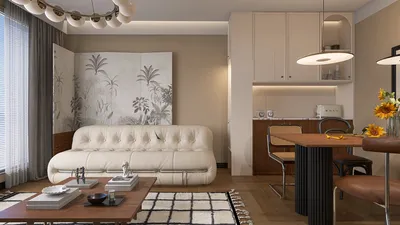


The integration of V-Ray rendering into the toolkit of interior designers has become essential for those aiming to produce realistic visualizations of their concepts. Regardless of whether you're designing compact areas or vast residences, mastering V-Ray can significantly enhance your presentations and client pitches. In this guide, we will delve into fundamental techniques and tips to achieve outstanding outcomes with V-Ray rendering.
Comprehending the Essentials of V-Ray
Before venturing into advanced methods, grasping the fundamentals of V-Ray is crucial. V-Ray serves as a robust rendering engine that integrates with numerous 3D modeling applications. Its features empower designers to replicate real-world lighting, materials, and textures in their interior spaces.
To begin, take the time to become acquainted with the V-Ray interface, which offers various options for modifying lighting, materials, and camera configurations. Mastering navigation within V-Ray’s features will not only streamline your workflow but also enhance the quality of your renderings.
Arranging Your Scene Effectively
Achieving a successful interior rendering starts with the correct setup of your scene. Below are several essential steps to keep in mind:
Enhancing Rendering Settings
For optimal results, it's vital to refine your rendering settings. Concentrate on the following aspects:
Utilizing Post-Processing Techniques
After completing your rendering, consider employing post-processing techniques to improve the final imagery:
Common Challenges in V-Ray Rendering
Even seasoned designers encounter obstacles when utilizing V-Ray. Some typical problems include:
Final Thoughts
V-Ray rendering is an essential expertise for any interior designer wishing to showcase their work compellingly. By mastering the basics, enhancing your settings, and applying post-processing techniques, you can craft remarkable visualizations that captivate clients and elevate your design presentations. Regular practice will sharpen your skills and allow you to explore the extensive capabilities V-Ray presents in the realm of interior design, particularly when used alongside tools like Homestyler.
Frequently Asked Questions
Q: What role does V-Ray play in interior design? A: V-Ray is instrumental in producing photorealistic renderings of interior environments, aiding designers in visualizing concepts and presenting them effectively to clients.
Q: What methods can I employ to decrease noise in my V-Ray renders? A: Elevating the sampling settings and making adjustments to light sources can significantly reduce noise in your renderings.
Q: Which software is compatible with V-Ray? A: V-Ray functions with various 3D modeling platforms, such as SketchUp, 3ds Max, and Rhino.
What began as an Autodesk innovation has evolved into a design platform used by more than 18 million people around the globe. Homestyler combines powerful rendering, an intuitive editor, and a vast furniture library to help you turn inspiration into photorealistic designs — whether you're redesigning a single room or planning an entire home.
Discover the No.1 Home Design Software
Design Now for FREE
































