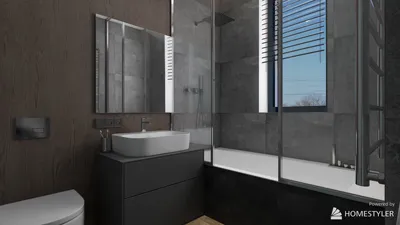


Interior rendering stands as a pivotal element of contemporary design, particularly when leveraging tools like 3ds Max and V-Ray to generate breathtaking visuals. Whether your focus is on compact areas or expansive environments, mastering these software can greatly streamline your workflow and improve your results. This guide delves into key techniques that will enhance your interior rendering abilities, specifically focusing on the effective use of V-Ray within 3ds Max and introducing how Homestyler can be integrated into your design process.
Fundamentals of 3ds Max and V-Ray
To get started, it's vital to become acquainted with the 3ds Max interface and the various capabilities V-Ray offers. This part will detail the fundamental components, encompassing:
Illumination Strategies for Spectacular Interiors
Lighting is crucial for achieving realistic interior renders. In this section, we will investigate various illumination strategies that are particularly effective when using V-Ray:
Creating Materials and Texture Application
The selection of materials can greatly influence your render's outcome. Let’s examine how to construct lifelike materials using V-Ray:
Rendering Configurations for Enhanced Performance
Fine-tuning your rendering configurations in V-Ray can result in quicker render times without compromising quality:
Post-Render Techniques in V-Ray
Post-processing is crucial to polish your images post-rendering. This section highlights:
Conclusion: Generating Compelling Interior Renders
Achieving proficiency in 3ds Max and V-Ray demands dedication and practice, yet with these strategies, you can produce striking interior renders that highlight your design expertise. Remember to explore various settings and methods, experimenting until you discover the approaches that best suit your projects. Additionally, incorporating tools like Homestyler can further enhance your design capabilities.
Frequently Asked Questions
Q: What are some recommended lighting techniques for interior rendering? A: Employ a mix of natural light and artificial sources to craft depth and ambiance. Utilizing V-Ray's Sun and Sky features can effectively replicate daylight.
Q: How can I increase rendering efficiency in V-Ray? A: Boost your rendering speed by fine-tuning quality settings, utilizing proxies for intricate models, and minimizing the image size for testing renders.
Q: Why is post-processing significant in rendering? A: Post-processing allows you to enhance your rendered visuals, adjust colors, and incorporate effects that can drastically elevate the image quality.
Welcome to the Leading Home Design Software
تصميم الآن مجانا
































