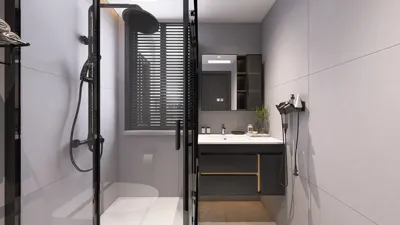


Creating a high-definition (HD) 3D model is an exhilarating venture that unlocks a myriad of creative opportunities in design and artistry. Whether you're an emerging artist or an experienced designer, grasping the fundamental concepts will set you up for success in your projects. Here’s a comprehensive guide on efficiently crafting an HD 3D model using tools like Homestyler.
Understanding 3D Modeling Software:
The initial step in creating your HD 3D model involves choosing the appropriate software that meets your needs. Among the widely recognized options in the industry, software such as Blender, AutoCAD, and 3ds Max stand out. Each of these applications comes with unique functionalities catering to various skill levels and project requirements. Take some time to explore these tools to find one that fits your expertise and project objectives. Have you worked with specific software before? We’d love to hear your insights!
To get started, download and install your chosen software, then take some time to become familiar with its interface. Most programs include tutorials and guides that can ease your understanding of core functionalities. Have you faced obstacles while learning new software? Share your effective strategies with us!
Begin with Basic Shapes:
Start your modeling journey by creating simple geometric shapes. Most 3D software enables users to manipulate primitive forms like cubes, spheres, and cylinders. These basic shapes serve as the foundation for developing more complex designs later. Are you eager to see how these simple geometric figures can evolve into intricate models?
Combine, modify, and reshape these primitives to match your vision for the end product. Dedicating time to mastering these essential elements can greatly improve the quality of your output. What remarkable 3D model are you dreaming of creating? Share your aspirations with us!
Refining Your Model:
Once you’ve laid down the basic shape, the next phase is to enhance the model by incorporating finer details. Leverage tools like edge extrusion, loop cuts, and sculpting features to refine your model’s characteristics. Pay attention to achieving accurate proportions and scales for a lifelike appearance. Are there certain traits you deem crucial in your designs? We invite you to share your thoughts!
Applying textures becomes vital during this step. Using high-resolution textures can effectively breathe life into your 3D model. Explore a range of materials such as metal, fabric, or wood based on your project’s needs. Have you experimented with different textures? Which ones have been the most successful in your projects?
Final Touches and Rendering:
The final step involves rendering your model, transforming your 3D scene into a 2D image that showcases all the textures, lighting, and intricate details you've meticulously worked on. Experimenting with various lighting setups can help you achieve the desired ambiance and effect for your model. Do you have a favorite rendering technique that consistently delivers excellent results?
After rendering, take a moment to evaluate your work critically and make adjustments as needed. Collaborating with peers for feedback during this stage can provide invaluable insights and new perspectives on your project. Have you previously collaborated with others? What was the outcome of your teamwork?
FAQ
Q: What software is ideal for creating HD 3D models?A: Popular tools include Blender, AutoCAD, and 3ds Max, tailored to your specific needs and experience level.
Q: Is it possible to create an HD model without prior experience?A: Absolutely! Starting with tutorials and mastering basic shapes enables individuals to gradually develop their skills in 3D modeling.
Q: Why are textures important in 3D modeling?A: Textures add essential realism and intricate details, enhancing the visual appeal and lifelike quality of your model.

Minimalist Fluted Solid Wood Round Coffee Table 3D Model

Minimalist Fabric Loveseat Sofa with Black Metal Legs 3D Model

Minimalist Concrete Planter Pot with Indoor Greenery 3D Model
Homestyler is your ultimate online design companion. Its user-friendly design tool allows you to create stunning 3D renderings and explore a wealth of design projects. Plus, with a library of DIY video tutorials, transforming your space has never been easier or more fun!
تصميم الآن مجانا
































