


Crafting a 3D model for a comic can be an exhilarating journey, transforming flat 2D illustrations into vivid, three-dimensional forms that enhance storytelling and engagement. Whether you're a comic creator venturing into this innovative medium or a designer eager to experiment, this comprehensive guide will provide you with the fundamental knowledge needed for effective 3D modeling in comics, especially utilizing tools like Homestyler for your layouts.
Step 1: Establish the Comic's Aesthetic
Before you start modeling, it’s crucial to analyze the visual aesthetic of your comic. Is the style whimsical, hyper-realistic, or a blend of both? Grasping this will not only guide your approach to 3D modeling but also inform your choices in software and methods. Collect reference images of characters, props, and settings to aid your creative process.
Step 2: Select Appropriate 3D Modeling Software
Some popular choices include Blender (which is free), Autodesk Maya, and ZBrush for detailed sculpting. Blender is particularly recommended for comic artists due to its flexibility and no-cost access. Once you have installed your selected software, take some time to get comfortable with its user interface and features.
Step 3: Create Basic Shapes
Begin by blocking out your character or scene using basic geometric forms like cubes, spheres, and cylinders. This blocking phase is essential for establishing proportions and overall composition before delving into the finer details. Utilize your comic sketches as guides by importing them into the software as background reference images to ensure accuracy in your modeling.
Step 4: Sculpt and Polish Details
Move on to sculpting and refining your basic shapes into more recognizable figures. Pay attention to elements such as silhouette, anatomy, clothing drapery, and facial expressions if applicable. During this refinement stage, topology becomes a critical aspect, especially if you intend to pose or animate your characters in the future.
Step 5: Apply Textures and Materials
Enhance your models by applying colors, textures, or even customized hand-painted details that align with your comic’s visual style. You can utilize texture-painting tools or engage in UV mapping for transferring 2D designs onto 3D models. Techniques like cell-shading or outline shaders are effective in capturing that classic comic book feel in your creations.
Step 6: Pose, Illuminate, and Render
Set your models in dynamic poses to reflect the energy typical of comic panels. Lighting plays a key role here; implement dramatic shadows or highlights for added effect. Experiment with camera settings and rendering options to achieve striking comic-style visuals in your images or sequences.
As a designer, I frequently utilize digital resources that enhance the modeling process and facilitate quick spatial visualization. For scenes rich in narrative, like an urban alleyway or a whimsical fantasy setting within a comic layout, incorporating a 3D Floor Planner can significantly expedite spatial design, allowing for a better focus on character and plot development. Homestyler will be particularly useful in these scenarios.
Tips 1:
Always remain attentive to the scale and proportion of your 3D models. In visual storytelling, even minor discrepancies can influence how characters engage with their surroundings. Treat your comic's 3D scenes like interior design—consider movement pathways, vantage points, and how focal elements direct the reader's attention across the panels.
FAQ
Q: What is the best software for creating 3D comic models?
A: Blender is widely appreciated for its extensive capabilities and accessibility; however, Maya and ZBrush are also favored for their robust character modeling features.
Q: Is it possible to use 3D modeling if I lack drawing skills?
A: Definitely! 3D modeling can bridge the gap left by varying drawing abilities, aiding in the generation of dynamic perspectives or references for your 2D artwork.
Q: How can I achieve a comic-book aesthetic in 3D renders?
A: Techniques such as cell-shading, outline shaders, and hand-painted textures are excellent for recreating the flat, graphic style associated with traditional comics.
Q: Is 3D modeling beneficial for comic backgrounds?
A: Absolutely. 3D modeling allows for the easy reuse and modification of environments, ensuring consistency across scenes while reducing time spent on intricate backgrounds.
Q: What are the steps to convert a 2D comic character into a 3D model?
A: Start by using reference images (both front and side views), block out the basic shapes, sculpt the overall forms, and finally refine the details and textures to align with the original concept.
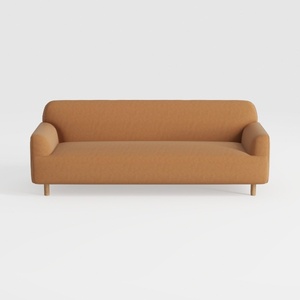
Minimalist Fabric Wooden Legs Sofa 3D Model
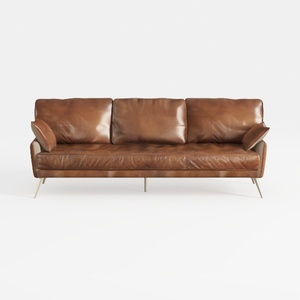
Modern Vintage Leather 3 Seater Sofa With Metal Legs 3D Model

Minimalist Boucle Fabric Tufted Sofa 3D Model
If you're looking to transform your home with ease, Homestyler is your go-to online design platform. Its user-friendly design tool allows you to experiment with 3D renderings, explore numerous design projects, and access engaging DIY video tutorials. Bring your vision to life effortlessly!
Diseño ahora GRATIS
































