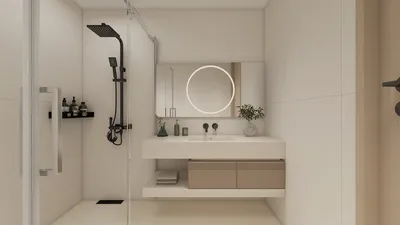


Transforming your floor plan into a 3D model can significantly enhance your interior design projects by providing a clear visualization of how to optimize compact spaces. With more than a decade of expertise in interior design, I can assist you in converting a basic 2D layout into a comprehensive 3D representation. This process not only clarifies the spatial arrangement but also effectively brings your design concepts to life, enabling you to make well-informed choices regarding furniture arrangement, color combinations, and overall visual appeal.
Step 1: Select an Appropriate Software
Choose an intuitive 3D modeling software that aligns with your requirements. Options such as SketchUp, AutoCAD, and Homestyler are popular. Each program has unique advantages, so factor in your technical expertise and the intricacy of your design when making a selection.
Step 2: Upload Your Floor Plan
After picking your software, the next crucial step is to upload your floor plan. Most platforms allow the upload of scanned images or PDFs of your 2D design. It is vital to ensure the dimensions are precise to uphold the accuracy of your model.
Step 3: Begin Building the 3D Model
With your imported floor plan as a guide, start constructing your 3D environment. This involves creating walls, adding windows and doors, and setting the area layout. It’s important to focus on scale, particularly in smaller areas, to enhance usability.
Step 4: Decorate and Furnish
Now it’s time for the enjoyable stage! Choose furniture and decor that resonate with your style. Opt for versatile furniture pieces to make the most of your space and don't overlook the importance of integrating clever storage solutions. Adjust the item placements as needed to find the most effective arrangement within your design.
Step 5: Play with Colors and Textures
Incorporate colors, materials, and textures into your walls, floors, and furnishings to enliven your 3D model. This step is crucial for visualizing how varying elements work harmoniously, especially in smaller areas where every element counts.
Step 6: Visualize and Share Your Work
Once your 3D model is finalized, make use of the presentation tools in your software to create realistic renders. Share these images with clients or peers to gather insights. This collaborative feedback can further refine your design.
Conclusion
Converting your floor plan into a 3D model is a vital skill for both interior design professionals and DIY enthusiasts. By adhering to these steps, you can craft a space that not only looks appealing but also operates effectively, particularly in compact settings. Keep in mind that small spaces shouldn’t mean sacrificing style or efficiency; they just demand a bit more creativity!
FAQ
Q: Which software is ideal for generating 3D models from floor plans? A: Recommended platforms include SketchUp, AutoCAD, and Homestyler, each catering to varied user demands and levels of expertise.
Q: How can I make the most of small spaces in my 3D design? A: Use multi-functional furniture and smart storage solutions, while considering an open layout to optimize usability.
Q: Do I need prior design experience to create a 3D model? A: While some familiarity can be advantageous, many software options are designed for user-friendliness, making them accessible to newcomers.
Welcome to Use Free 3D Floor Planner
Diseño ahora GRATIS
































