


In the realm of 3D modeling, altering the colors of a model can significantly boost its visual attractiveness and communicate the desired message effectively. By honing in on the appropriate techniques, you can ensure that your 3D models truly capture attention.
Grasping the Fundamentals of 3D Model Colors:
Prior to embarking on the color modification process, it's vital to comprehend the framework of your 3D model. Many 3D modeling tools allow users to apply colors to various portions of the model. Regardless of whether you're utilizing platforms such as Homestyler or Blender, the core principle remains consistent across different software.
Begin by selecting the model you wish to modify. Find the materials or textures panel, which generally includes options for adjusting colors. In this area, you can either select a color from a palette or manually enter RGB values.
A Step-by-Step Approach to Modifying Colors:
1. **Activate Your Model**: Click on the 3D object to select it. This action is essential, as some software requires that you choose the model before any changes can be made.
2. **Access Material Properties**: Look for the material properties tab, where you will see the current color configurations for your selected model.
3. **Select a New Color**: You can opt for a pre-defined color from the palette or concoct a unique shade by blending RGB values. Experiment until you achieve the desired appearance.
Advice for Successful Color Alterations:
Consider incorporating complementary colors to elevate the design aesthetics. Additionally, feel free to experiment with different finishes, such as matte or glossy, to observe how they influence the model's look under varying lighting conditions.
Frequently Asked Questions
Q: Which software can I utilize to modify 3D model colors? A: You can employ tools like Blender, Homestyler, or AutoCAD, among others, for changing colors in 3D modeling.
Q: Is it possible to preview changes before finalizing them? A: Yes, most modeling software offers a preview feature to visualize how colors will appear before they are applied.

Minimalist Modern Fabric Sectional Sofa Living Room Set 3D Model
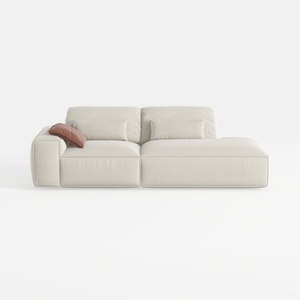
Minimalist Beige Fabric L-shaped Chaise Sofa 3D Model


Minimalist Black Stone Coffee Table Unique Irregular Shape 3D Model
Looking to transform your space effortlessly? Homestyler is your go-to online home design platform. With its user-friendly design tool, stunning 3D renderings, inspiring design projects, and helpful video tutorials, you can create your dream home in no time. Start designing today!
Design jetzt kostenlos
































