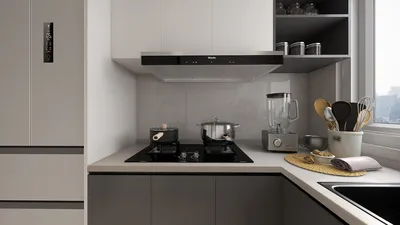


For professionals like interior designers, architects, and real estate agents, high-quality floor plan renderings are crucial. They not only assist clients in visualizing spaces but also reflect your design expertise and meticulousness. This is where the power of 3D rendering comes into play. In this comprehensive guide, we'll explore everything you need to know about creating floor plan 3D renderings using innovative tools like Homestyler.
What is 3D Rendering?
3D rendering refers to the process of generating a three-dimensional image or animation from a two-dimensional model or image. When applied to floor plans, it facilitates the creation of a virtual representation of the space, incorporating textures, lighting, and various intricate details. This technique allows you to present your designs in a more compelling and lifelike manner compared to standard 2D floor plans.
Why Use 3D Rendering for Floor Plans?
Utilizing 3D rendering for floor plans offers numerous advantages. Primarily, it presents your designs in a more vibrant and engaging format. Clients can visualize how the space will appear, including aspects like lighting, textures, and other key details. This clarity aids them in making well-informed design choices and boosts their confidence in your capabilities as a designer.
How to Create 3D Renderings for Floor Plans
To produce 3D renderings for floor plans, follow a structured approach. Start by creating a 2D floor plan using specialized software. Once your 2D layout is ready, you can import it into a 3D rendering tool—one great option is Homestyler. This software will allow you to enhance your design with textures, lighting, and additional details, crafting a captivating and realistic 3D representation.
Best Practices for 3D Rendering
There are several best practices to consider when generating 3D renderings for your floor plans. First, ensure that you begin with a high-quality 2D layout; this foundation is essential for achieving an accurate and realistic 3D model. Next, focus on the intricate details of lighting and textures, as they significantly influence the realism of the rendering. Lastly, don’t hesitate to experiment with various angles and perspectives to effectively highlight your design work.
Conclusion
3D rendering has become an indispensable tool for interior designers, architects, and real estate professionals. By crafting lifelike and captivating 3D renderings of your floor plans, you can effectively demonstrate your design prowess and assist clients in visualizing their spaces. Leveraging the right software, such as Homestyler, along with following best practices, will enable you to produce stunning 3D renderings that captivate clients and enhance your presence in a competitive landscape.
Are you ready to enhance your floor plan renderings? Explore Homestyler for all your 3D rendering requirements!
Built on technology originally developed at Autodesk, Homestyler empowers anyone to design beautiful, realistic spaces in minutes. Join over 18 million users who have already discovered a smarter way to plan, visualize, and bring their dream homes to life — all from the comfort of a browser.

Minimalist Walnut Round Coffee Table 3D Model


Minimalist Cream Fabric Modular Sectional Sofa 3D Model

Minimalist Fabric Curved Sectional Sofa With Decorative Pillows 3D Model
Homestyler is your go-to online home design platform! With its user-friendly design tool, stunning 3D renderings, diverse design projects, and helpful video tutorials, you can effortlessly create and visualize your dream spaces. Start your design journey today and unleash your creativity!
Дизайн сейчас бесплатно
































