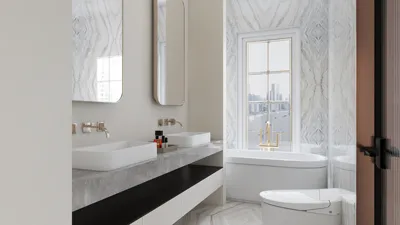


Throughout my experience designing numerous small office spaces, one consistent insight arises: a compact layout does not hinder functionality as long as it aligns with the intended behaviors of its users. An effective design incorporates the right balance of spatial dimensions, lighting, acoustics, and established workflow protocols, carefully selecting furnishings and materials to complement these factors. When executed correctly, an office area of 350–600 sq ft can foster focus, teamwork, and overall wellness without creating a cramped atmosphere. Homestyler can be an invaluable tool to visualize these layouts vividly in the planning stage.
Two key insights form the foundation of my design methodology. The first is drawn from Gensler's U.S. Workplace Survey, which reveals that diverse work environments accommodating various activities (like focused work, collaboration, social interactions, and learning) result in better effectiveness and employee satisfaction; layouts that integrate multiple uses tend to outperform those dedicated to a single purpose. The second insight from WELL v2 emphasizes the significance of lighting and ergonomic considerations: supportive lighting that aligns with circadian rhythms and adjustable work stations enhance both comfort and productivity. I ensure that light levels adhere to IES standards, recommending 300–500 lux for general desk tasks, complemented by a color temperature of 3000–4000K to bolster alertness and mitigate glare. For seated tasks, I incorporate task lighting designed for glare reduction and add acoustic enhancements to promote a calm visual workspace.
In small office designs, every inch counts. I plan circulation routes to maintain widths of 36–42 inches for primary walkways, ensuring that desk edges have at least a 30-inch clearance, and organizing seated-to-standing workstations in configurations measuring 60 inches for optimal movement. Spatial harmony is just as crucial as the overall area: uniform desk widths ranging from 24 to 30 inches, eighteen-inch storage depths, and consistent partition heights foster visual coherence, giving the impression of a more spacious environment. When exploring various layout options, I utilize Homestyler to simulate sightlines, lighting effects, and acoustic zones effectively before finalizing designs.
Fundamental Guidelines for Designing Compact Office Spaces
• Prioritize behavior over furnishings. Identify key tasks (such as deep work, brief meetings, or focused phone calls) and allocate space based on their frequency and duration. Tasks requiring significant concentration should be situated in the quietest areas with optimal lighting.
• Maximize spatial proportions. In very small offices, allocate around 60–65% of the space for individual tasks, 20–25% for collaborative efforts, and the remainder for circulation and storage. Adjust these proportions only if your team’s workflow demands a change.
• Manage the lighting environment. Aim for 300–500 lux on work surfaces, 100–200 lux in transit areas, and a warmer ambient light of 2700–3000K in relaxation zones. Utilize dimmable task lighting and matte finishes to minimize glare and eye strain.
• Plan for acoustic control. In small environments, opt for NRC 0.7+ ceiling materials, area rugs, and wall panels to absorb sound around communication zones. Position printers and noisier equipment away from critical focus areas to reduce distractions.
• Incorporate flexibility within the design. Mobile tables, stackable chairs, and foldable whiteboards allow a single room to transform from six concentrated workspaces to an engaging collaborative area in under five minutes.
Five Effective Layout Ideas for Small Office Spaces
Arrange individual desks along the periphery to utilize wall outlets and natural light efficiently. Include a tall acoustic panel or plant screen behind computer monitors to reduce glare and soften ambient noise. Centrally, a high table can serve as a communal space for quick discussions and laptop tasks, ensuring the island's proximity is maintained at 36 inches from surrounding seating to facilitate smooth movement. Incorporate a compact mobile whiteboard that can be stored into a wall rail when not in use.
Establish a central ‘spine’ for storage and cable management, using shallow credenzas (12–15 inches deep). On each side, create bays for pairs of desks (48–60 inches wide each). Every bay should feature task lighting, a pinup board, and an acoustic panel. This central spine conceals printing equipment and supplies, minimizing visual chaos. Keeping circulation pathways along the periphery helps maintain a quieter center.
Utilize two sliding glass or polycarbonate panels to transition between open and enclosed settings. When in open mode, the panels stack aside to create airflow, while in enclosed mode, one panel can cordon off a small call area, and the other creates a micro meeting space for two individuals. Using panels with STC-rated tracks and soft seals enhances speech privacy without the need for heavy construction. This innovative approach proves cost-effective compared to traditional wall building and maintains access to natural light.
Install a 24-inch-deep standing bar along a window for quick laptop work and transient stays; pair with ergonomic mats and height-adjustable stools. Across from the bar, create a serene area featuring two high-back lounge chairs positioned away from the entrance, divided by a narrow table. High-back designs act as sound barriers, offering a quiet retreat within a limited spatial area.
Design a project wall equipped with a rail system for flip-down tables, sliding whiteboards, and magnetized panels. In normal use, the room accommodates four desks. For collaborative sprints, fold desks up (supported by wall-mounted systems) and introduce a central table. Manage cabling near the baseboard while specifying quick-connect power strips. The rail's visual continuity maintains order even as furniture is frequently reconfigured.
Ergonomics and Human Factors in Space Design
I tailor small office designs to cater to a diverse range of individuals and tasks. Desks at heights of 28–29 inches for seated use and 42–43 inches for standing accommodate most users, while sit-stand options offering a range of 22.6–48.7 inches can fit a wider demographic. Chairs with four-dimensional adjustments and lumbar support help alleviate stress on shoulders during extended laptop sessions. Ensure monitors are positioned at arm's length with the top third aligning with eye level; monitor arms are invaluable for maintaining desk space. Task lighting should be positioned opposite the user's dominant hand to eliminate shadows. Proper cable management can reduce visual clutter and prevent trip hazards—common stressors in smaller environments.
Using Lighting to Create the Illusion of Spaciousness
To enhance the perception of space in compact offices, implement layered lighting techniques. Illuminate walls with indirect sources to create depth, then add focused, glare-controlled task lighting on work surfaces. Opt for a color temperature of 3000–3500K for ambient light, while task lighting can range from 3500–4000K for optimal clarity. To minimize reflections on screens, choose matte paint finishes (≤10 gloss), low UGR fixtures, and micro-prismatic diffusers. Following IES recommendations and WELL v2 standards for visual comfort can help reduce fatigue while stabilizing circadian rhythms.
Achieving Acoustic Comfort Without Physical Barriers
In smaller rooms, managing acoustic decay time (RT60) requires lightweight solutions. Aim for an RT60 of 0.4–0.6 seconds. This can be accomplished with a sound-absorbent ceiling (NRC 0.7+), dense underlay rugs, and at least 15–25% of wall area treated with sound panels or felt baffles surrounding conversation spaces. Soft dividers around collaborative areas can prevent noise from encroaching on focus zones. Maintain glass where daylight is beneficial, but incorporate a narrow felt reveal at the top to help manage echo.
The Role of Color Psychology in Space Design
Color profoundly influences behavior. Soothing shades such as muted greens and soft blues enhance concentration, while vibrant accents (like ochre and terracotta) nurture energy levels. I strive for low saturation on expansive surfaces, saving brighter colors for functional highlights like drawer handles or stool seats. Following a 60/30/10 ratio (base color/secondary/accent) maintains harmony and reduces visual overload. High-contrast patterns can make spaces feel smaller; thus, I prefer subtle textures and consistent grain direction in wooden surfaces to create the impression of extended sightlines.
Considerations for Material Selection and Sustainability
In small offices, every material choice is amplified. Low-VOC paints, Greenguard Gold furnishings, and FSC-certified wood are crucial for maintaining good air quality. Opt for acoustic carpet tiles with cushioned backs, and select antibacterial surfaces in areas where food or shared desks are present. For durability, specify high-pressure laminates in high-traffic areas and rich wood or veneer finishes for key touchpoints where warmth is essential. Modular designs extend lifecycle and allow easy substitutions without contributing to waste.
Creating Discreet Storage Solutions
Hidden storage options help foster a serene small office environment. Use wall cabinets (12–15 inches deep) positioned above desk height, under-bench drawers, and vertical storage slots for samples or technology. Establish a 'landing zone' near the entrance for bags and packages to prevent cluttering focus areas. Cable trays, grommets, and floor outlet strategies keep technology out of sight yet easily accessible.
Navigating Traffic Flow and Spatial Relationships
Prioritize quiet intervals by placing door swings away from concentrated work areas. Collaboration zones should be a minimum distance of one desk away from heads-down setups. If you have a printer in the room, position it near a hard boundary, buffered by storage and subdued panels to lessen noise. In multi-user spaces, arrange seating orientations that limit visual interactions during intense work sessions. If uncertain, utilize an interior layout planner or simulation tool to examine circulation paths and sightlines thoroughly before implementation.
Integrating Technology Effectively
Small office environments thrive with wireless-first approaches and ceiling-mounted access points to free up desk space. Use displays on swing arms for multifunctional use in both collaborative and individual settings. A compact soundbar equipped with beamforming microphones enables seamless video calls in small spaces. Implement occupancy sensors to adjust lighting for efficiency; connect them to customized scenes for focused work, teamwork, and presentations.
A Step-by-Step Planning Guide
1) Identify the work modes and their allocated time.
2) Tape out the room at a 1:1 scale to verify clearances.
3) Establish a lighting plan with desired lux levels and color temperatures.
4) Define sound treatment strategies for different zones.
5) Select ergonomic furniture with adjustable features.
6) Plan for concealed storage and cabling pathways.
7) Test at least two layout alternatives using a room design visualization tool before making final purchases.
8) Once finalized, commission the space: adjust lighting, set scenes, and calibrate sensors appropriately.
Common Questions and Answers
Incorporate versatile elements: a high table that functions as a touchdown hub, sliding panels to isolate a call nook, and mobile whiteboards serving as acoustic barriers. Arrange focus seating around the perimeter and collaborative areas at the center to effectively separate activity from concentration zones.
The recommended lighting arrangement is to aim for 300–500 lux at work surfaces, 100–200 lux in circulation areas, and a warmer 2700–3000K ambient light in lounges. Combine dimmable task lighting with glare-reducing features and matte finishes to improve comfort.
Achieve sound absorption using NRC 0.7+ ceiling tiles, a plush rug, and 15–25% wall treatment with acoustic panels. High-back lounge seating and mobile partitions near collaborative areas help prevent auditory disruption in focus zones.
Utilize a desk dimension of 24–30 inches in depth and 42–60 inches in width per individual, depending on the equipment used. Monitor arms allow for shallower desks while maintaining ergonomic standards.
Yes, selecting compact tops (24–27 inches deep) and shared sit-stand benches for hot desking makes it feasible. The height range should accommodate approximately 22.6–48.7 inches to suit the majority of users.
Lighter shades with low saturation on larger surfaces help to create an illusion of spaciousness. Integrate deeper accents sparingly. Maintaining a 60/30/10 ratio offers a balanced aesthetic and minimizes visual distraction.
Ensure a clear main aisle of 36–42 inches and a 30-inch clearance at the edges of desks. Avoid dead ends near entryways. Validate pathways using tape on the floor prior to furniture purchase.
Employ cable trays beneath desks, floor boxes at shared tables, and a central distribution system for power access. Specify grommets, Velcro ties, and snap-on channels to maintain surface cleanliness.
Position noisy equipment along a hard boundary near the entrance, buffered by storage solutions and lightweight acoustic panels to reduce disruption. Ensure it remains out of the sightlines of focus seating areas.
Absolutely—incorporate beamforming microphone soundbars, soft visual backdrops, and a lighting setup that harmonizes face illumination with low-glare ambient lighting. Include a sliding screen for isolation of the call area when necessary.
Utilize low-VOC paints, Greenguard Gold-certified furniture, FSC wood options, and cushion-backed carpet tiles. Apply High-Pressure Laminates in frequently used spaces and reserve veneer finishes for areas where tactile warmth is prioritized.
Choose modular furniture, a rail system for project management, and mobile tables. Strategize power access in flexible configurations to facilitate easy reconfiguration without extensive electrical work.
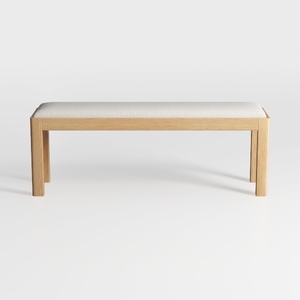
Minimalist Oak Fabric Upholstered Dining Bench 3D Model
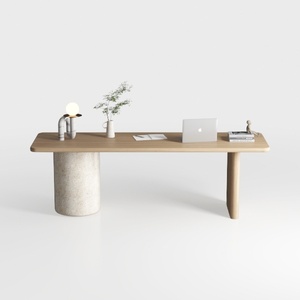
Minimalist Japandi Solid Wood Concrete Office Desk 3D Model
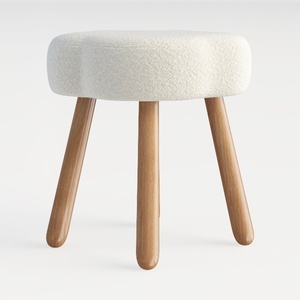
Minimalist Boucle Wooden Ottoman 3D Model
Discover the magic of home design with Homestyler! This user-friendly online platform offers powerful design tools, stunning 3D renderings, and a wealth of inspiring DIY video tutorials. Unleash your creativity and transform your space effortlessly—perfect for both beginners and seasoned DIYers!
지금 무료로 디자인하세요
































