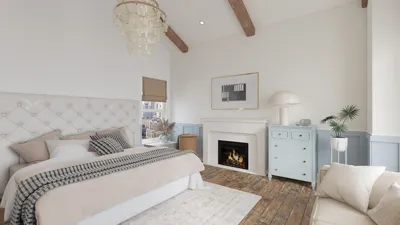


Designing a 3D representation of your room offers an exciting way to bring your decorating ideas to life. Whether you are considering a minor refresh or a complete overhaul, utilizing a 3D model can significantly streamline your decision-making process. So, what are the steps to effectively 3D model your space? Let’s explore!
Grasping the Fundamentals of Room Modeling
Before diving in, it's crucial to understand the foundational elements. Begin by accurately measuring your space. Use a tape measure to capture the dimensions of walls, windows, and doors, ensuring your model is to scale. Why is this step vital? A precise model guarantees that your furniture arrangement and design are realistic and achievable.
Next up, choose a user-friendly 3D modeling software. Tools like SketchUp, Homestyler, and Sweet Home 3D are excellent choices for novices. Have you experimented with any of them yet? Each program features unique benefits, so it may be worth testing a few to find the one that resonates most with you!
A Step-By-Step Approach to 3D Modeling Your Room
Once your software is set up, follow these sequential steps to create your room model:
1. **Establish the Floor Plan**: Start by entering the dimensions you've gathered to create the floor plan of your room. Most software enables input of exact measurements, ensuring a precise layout.
2. **Construct Walls and Openings**: After the floor plan is drafted, proceed to add walls, windows, and doors. This will form your room's structure, ensuring all elements are well-placed within the space.
3. **Populate with Furniture and Decor**: Browse the furniture and decorative items available in the software's library. Remember to consider scale; if a sofa appears oversized in your model, it will likely be the same in reality.
4. **Play with Aesthetics**: Experiment with color palettes, materials, and textures. Most applications allow you to modify wall and furniture finishes, enabling you to visualize various styles until you identify the perfect match for your vision.
5. **Render and Refine**: Finally, render your model to see it in a lifelike environment. Check for any inconsistencies or areas needing tweaks. While this stage may be time-consuming, it is essential for achieving the best results.
Enhancing Your 3D Room Modeling Experience
To improve your 3D modeling journey, consider these helpful suggestions:
- **Implement Realistic Lighting**: Good lighting can transform your space into an inviting setting. Adjust your virtual lighting to replicate natural sunlight streaming through your windows.
- **Add Textures**: Introducing textures can significantly boost your room's authenticity. Select suitable patterns and finishes for walls, floors, and furniture.
- **Frequent Saving**: Since 3D modeling can be quite time-intensive, ensure that you save your progress regularly to prevent any loss of work.
Frequently Asked Questions
Q: What is the top software recommended for beginners looking to 3D model a room? A: For those starting out, SketchUp and Homestyler are user-friendly options that offer a variety of tutorials and support resources.
Q: What is the typical timeframe to create a 3D model of my room? A: The duration can vary based on your familiarity with the process and the complexity of your design, ranging from a few hours to several days.
Q: Is it possible to try out different furniture choices in my 3D room model? A: Absolutely! Most 3D modeling software allows you to easily swap furniture and decor items, assisting you in selecting the best options for your space.


Homestyler is your go-to online home design platform! With its user-friendly design tool, stunning 3D rendering, and a rich variety of design projects and DIY tutorials, you can effortlessly transform your space into your dream home. Explore your creativity today!
Progetta ora GRATIS
































