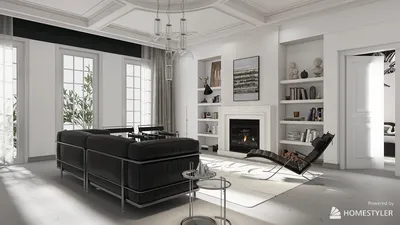


When I design gaming rooms, I approach it with the same principles as I do for critical workspaces: focusing on performance, comfort, and an immersive experience while infusing individuality. Utilizing a 3D model through Homestyler allows me to experiment with sightlines, acoustics, lighting dynamics, and the scale of furniture before making any purchases. This is crucial as guidelines, such as those from WELL v2, suggest a brightness level of 300–500 lux for visual tasks and highlight the importance of variable lighting to ease eye strain. Additionally, insights from IES underline that glare control and appropriate luminance ratios significantly improve visual comfort during screen-based tasks. Coupled with Gensler’s findings that well-structured environments enhance performance and experience metrics, the necessity of modeling before constructing becomes quite clear.
The selection of colors and layout greatly influences both physiology and behavior. According to research on color psychology by Verywell Mind, cooler shades can help decrease stress and lower heart rates, which is beneficial during extended gaming sessions, while vibrant accent colors can boost energy—perfect for competitive gaming areas. Regarding ergonomics, data from Herman Miller suggests that good posture support can enhance performance and minimize musculoskeletal fatigue, which is vital during those lengthy 'boss fights'. I incorporate these insights using Homestyler to adjust color temperatures between 3000K and 5000K, maintain task lighting around 300–500 lux, and ensure desk height, chair dimensions, and monitor placement reduce strain on the neck and shoulders.
Establish Your Purpose: Solo Grind, Co-op Hangout, or Streaming Studio
Before creating the model, clarify how the room will be used. A solo gaming setup requires a focused field of view, reflective finishes that minimize glare, and targeted task lighting. A co-op lounge benefits from adaptable seating arrangements, visual access to a large screen, and sound systems that reach every seat. For streamers, considerations include sound treatment, camera positioning, and lighting control for both the host and the backdrop. I delineate each section using Homestyler, simulating movements—such as turning towards the console, grabbing a controller, or transitioning from working at the desk to relaxing in the lounge—to ensure clear pathways.
Room Measurements, Visual Lines, and Spatial Relationships
In smaller spaces, it's essential to maintain a minimum circulation path of 900 mm and aim for a 1:1.6 visual balance between the display width and viewing distance to reduce eye strain. For systems with ultrawide or multiple monitors, the primary screen should stay within a 15–20° vertical viewing angle; the top edge should ideally be at or slightly below eye level. For setups with several stations, stagger desk depths (around 650–750 mm) to prevent chairs from bumping and ensure accessible cable management. While using Homestyler, I optimize wall-to-desk distances to at least 100 mm for efficient cable organization and effective cooling behind equipment.
Lighting: Multi-layered, Adjustable, and Glare-resistant
Gaming rooms thrive on layered lighting schemes. I recommend implementing three levels: ambient (using indirect cove or ceiling wash lights), task (dedicated lamps with shields), and accent (like RGB strip lights or backlighting). Employing bias lighting at about 10% of the screen's peak brightness alleviates eye strain during dark gameplay. For color temperatures, using 4000–5000K promotes alertness during competitive sessions, while a warmer 3000–3500K is ideal for late-night gaming. Maintaining gentle luminance ratios is crucial: ensure that the wall behind the screen is brighter than the monitor edges to prevent harsh contrast halos, consistent with IES recommendations for visual ease. Position lights to avoid reflections on shiny surfaces.
Ergonomics: Chair, Desk, and Monitor Arrangement
To sustain endurance, it's vital to prioritize ergonomics. I usually set desk heights between 710–740 mm (making them adjustable if possible). The distance from the monitor should be roughly 1.4–1.6 times the monitor’s diagonal for a single screen; for an array of three, curve them to match the natural reach arc and tilt inward for comfortable edge views. Maintain elbow angles of 90–110° with wrist-friendly input devices. For those frequently switching between controllers and keyboards, a pull-out tray or a secondary low-profile surface keeps shoulders relaxed. Footrests are beneficial for shorter gamers to maintain stable posture without raising chairs excessively.
Noise Control and Acoustic Comfort
An excellent gaming room should feel soundproofed even in boisterous moments. I incorporate a blend of broadband absorbers at reflection points, bass control in corners, and diffusers behind seating areas to prevent echoing. Utilizing fabric-covered wall panels, heavy curtains, and plush rugs enhances sound absorption without compromising aesthetics. For clear audio channels, separate game sounds from chat via an interface, and opt for closed-back headphones in shared spaces. Ensure efficient airflow for PCs with front-to-back setups and vibration-dampening mounts to minimize noise while maintaining optimal temperatures.
Color Psychology and Material Choices
The tactile feel of materials enhances immersion. I prefer low-gloss, low-VOC paints to minimize reflectiveness and odors. Behind screens, I use darker, muted colors, while vibrant accent tones are applied to side walls or shelves for added energy. Cooler shades like deep blues or charcoals evoke calm focus; a splash of red or neon accents can provide a lively backdrop for streaming. Surfaces within reach, such as desk edges and armrests, should feature warm-touch laminates or supple materials, reducing skin fatigue during prolonged sessions.
Storage Solutions, Cable Organization, and Airflow Management
Disorderly cables can disrupt a well thought-out design. Using Homestyler, I plan a cable trunk along the back edge of the desk, adding vertical raceways for power and data efficiently. I allow for 20–30% extra space in cable trays to accommodate future devices. For setups with multiple consoles and computers, a ventilated equipment bay with mesh doors and adequate clearance for intake and exhaust is essential. Elevating power strips off the ground and labeling cables can save significant time during upgrades.
Modeling Your Space Prior to Purchase
Creating a 3D model accelerates decision-making and prevents scale mismatches. I ensure the components are accurately represented: the footprint of chairs in their reclined positions, the reach of microphone booms, tripod placements, and door openings. The seating heights are monitored in Homestyler so the lowest chair still clears a bottom bezel by at least one-third of the screen’s height. If testing different desk positions or seating configurations, employing a room layout tool allows for effortless experimentation with flow, sightlines, and light placements—reducing guesswork.
Power, Networking, and Thermal Management
It's smart to anticipate your power needs and plan for more outlets than expected. I designate separate circuits for high-power devices such as PCs and amplifiers, ensuring dedicated lines for lighting to prevent flickering when demanding loads arise. When it comes to networking, wired connections take precedence, followed by Wi-Fi; I run Cat6 or superior wiring to the desk and set up a small switch from there. Place routers high up, away from heavy metal objects. Proper thermal management is also vital for comfort: position PCs with front air intakes facing open areas, raise them from carpets, and avoid sealing equipment in tight spaces.
Ready for Streaming: Camera, Microphone, and Background
For those who stream, I place the key light at a 30–45° angle, slightly above eye level, complemented by a soft fill light on the opposite side. RGB lights or LED bars can add depth to the backdrop without overshadowing skin tones. Keeping the environment tidy and reflective of personal branding—be it through floating shelves, trophy displays, or collectibles—helps tell your unique story. Testing camera angles within the Homestyler model ensures seamless captures without unwanted reflections or spills from screens.
Planning for the Future and Upgrade Options
Design with adaptability in mind. Ensure there’s vacant wall space for potential upgrades to ultra-wide monitors, keeping rack units available for future consoles, and sizing the desk appropriately to accommodate larger mouse pads or customizable keyboards. In terms of cable routes and storage, allocate an additional 25% in capacity for growth. Modular acoustic panels and magnetic lighting mounts can facilitate easy adjustments as your gaming setup evolves.
- Ambient lighting: 150–250 lux; task lighting: 300–500 lux; RGB accents: dimmable
- Color temperature variable 3000K–5000K
- Monitor alignment: top bezel near eye level with a 15–20° vertical angle
- Maintain a circulation path of at least 900 mm; chair-to-wall space of at least 600 mm
- Bias lighting around 10% of screen peak luminance
- Desk depth: 650–750 mm; allow 100 mm rear cable space
Frequently Asked Questions
Q1: What lighting levels are ideal for extended gaming?
A1: Aim for ambient lighting around 150–250 lux and task lighting between 300–500 lux, with bias lighting behind screens at approximately 10% of their brightness. A tunable range from 3000K to 5000K can help manage alertness and comfort according to the time of day.
Q2: What’s the ideal distance from the monitor?
A2: You should be about 1.4–1.6 times the diagonal size of the monitor for a single display. Keep the top bezel close to eye level while maintaining a gentle 15–20° vertical angle.
Q3: What colors are best for minimizing eye strain and stress?
A3: Use subdued cool tones such as charcoal, slate, or deep blue behind screens to reduce contrast and promote a calming focus, while incorporating small vibrant accents to energize the space without overwhelming vision.
Q4: How can I enhance acoustics without going overboard?
A4: A well-balanced approach includes a rug, thick curtains, and some broadband absorbers at primary reflection points, along with corner bass treatments. Adding a diffuser behind the main seating area keeps the space lively but controlled.
Q5: Are gaming chairs necessary, or will a good office chair suffice?
A5: A quality ergonomic office chair offering adjustable lumbar support, seat depth, and armrest customization often surpasses typical decorative gaming chairs in comfort for lengthy sessions. Focus on the fit and adjustability rather than just aesthetics.
Q6: What’s the most effective way to maintain a tidy cable system?
A6: Design a cable trunk along the rear edge utilizing Velcro ties, deploy under-desk trays with 20–30% spare capacity, and ensure vertical raceways for power organization while labeling both ends of every cable. Elevated power strips contribute to a cleaner setup.
Q7: How can I set up reliable power and networking infrastructure?
A7: Ideally, keep high-draw devices on separate circuits when feasible, maintain clear circuits for lighting, and prioritize wired connections (Cat6 or better) along with a small switch at the desk. Position routers overhead and away from heavy metal surroundings.
Q8: What is the best lighting setup for streaming?
A8: Utilize a soft key light positioned 30–45° off-axis slightly above eye level, complemented by a gentle fill light on the opposite side and adjustable RGB accents in the background. It's crucial to balance color temperatures to accurately depict skin tones.
Q9: What strategies keep my PC cool without increasing noise levels?
A9: Facilitate airflow from front to back, utilize larger slow-running fans, decouple the case from hard surfaces with vibration-resistant mounts, and provide adequate clearance of 50–75 mm at intake and exhaust points.
Q10: What mistakes should I avoid when laying out small rooms?
A10: Avoid crowding around chair swing zones, refrain from placing glossy surfaces directly opposite screens, and do not confine equipment to sealed cabinets. Ensure a clear walking path of at least 900 mm and a minimum of 600 mm behind seating.
Q11: Is it possible to have a lounge-style setup that is still competitive?
A11: Absolutely! By controlling glare, ensuring appropriate viewing distances, and using supportive seating with correct head and lumbar angles, with a small task table for peripherals and snacks, a lounge can be competitive without disrupting sightlines.
Q12: How can I utilize a 3D model for testing upgrades?
A12: Load accurately scaled assets (monitors, boom arms, gaming towers), simulate chair recline and microphone swing, check door clearances, and try different lighting configurations. A dedicated room design visualization tool offers rapid iteration: such as using Homestyler.
Homestyler's roots trace back to Autodesk, the global leader in design and engineering software. That heritage lives on in every feature we build. Today, with a community of more than 18 million users worldwide, Homestyler continues to make professional-quality interior design accessible to everyone — from first-time decorators to seasoned architects.
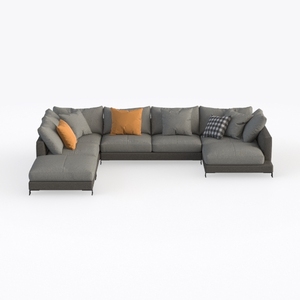
Modern Grey Fabric U Shape Sectional Sofa With Decorative Throw Pillows 3D Model

Rustic Solid Wood Fabric Upholstered Window Bench with Decorative Throw Pillows 3D Model
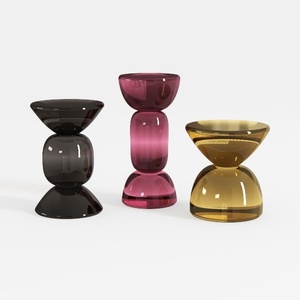
Contemporary Colored Glass Side Table Set 3D Model
Homestyler is your go-to online platform for home design! With its user-friendly design tool, stunning 3D renderings, and a wealth of design projects and video tutorials, you can effortlessly turn your home styling dreams into reality. Unleash your creativity and transform your space today!
Дизайн сейчас бесплатно
































