

I view study rooms as dynamic environments that play a crucial role in enhancing focus, memory, and mental comfort. The principles of Vastu provide a directional framework that aligns the area with intention and clarity. Coupled with in-depth research on lighting, ergonomics, and behavioral tendencies, these concepts transform a simple study corner into a robust hub for deep concentration. By integrating tools like Homestyler into this design process, the creation of an effective study space becomes both efficient and visually appealing.
Research supports the notion that our built environments influence our cognitive processes. According to findings from Steelcase, factors such as acoustics and the ability to control distractions greatly affect our productivity and engagement levels. The WELL v2 framework highlights the importance of visual comfort by advocating for glare reduction and balanced illuminance to minimize eye fatigue during tasks. I incorporate these insights with Vastu guidelines; for instance, positioning the desk to face either east or north optimizes natural light while ensuring a culturally coherent and functionally efficient layout.
The quality of light in a study environment is essential. The Illuminating Engineering Society recommends maintaining task lighting levels between 300–500 lux for activities like reading and writing, with color temperatures ideally ranging from 3000–4000K to foster sustained focus and alleviate visual strain. Furthermore, color psychology principles from Verywell Mind suggest that shades of blue promote calmness and concentration, while soft greens help to alleviate anxiety. By utilizing these hues, I strive to harmonize Vastu’s calming aspects with psychological stability in the room's design. This approach allows us to practically apply Vastu concepts to create aesthetically pleasing and functional setups.
Essentials of a Vastu-Aligned Study Room
• Desk Direction: When seated, orient yourself towards the east or north. The east is associated with increased clarity and learning, while the north symbolizes growth and new opportunities. These orientations typically align with the morning light trajectories, minimizing glare exposure in many households.
• Desk Placement: Ensure that your desk has a solid backing by positioning it against a wall. This setup decreases visual distractions and adheres to ergonomic principles, as limiting movement in your sides reduces cognitive strain.
• Book and Storage Organization: Position books on the west or south walls, avoiding overhead storage directly above the desk. High storage can create a sense of tension due to the perceived weight overhead, whereas low, organized shelving minimizes visual clutter and eases access.
• Avoiding Beams: Steer clear of sitting directly under structural beams. Beams can create a psychological sensation of pressure and can reflect sound, so slightly shifting your position can enhance both comfort and acoustics.
Lighting Approaches: Natural and Task Light
• Daylight Design: Place the desk to receive indirect natural light from the side, ideally from the left, particularly if you are right-handed to prevent shadowing. The aim is to achieve uniform light across the desk without any glaring hotspots.
• Task Lighting Solutions: Incorporate adjustable LED lamps providing 300–500 lux illumination on the workspace, ensuring they have a Color Rendering Index (CRI) of 90 or above for accurate color visibility in your notes and diagrams. Implement glare shields or matte finishes to eliminate reflections from glossy pages.
• Layered Lighting Strategy: Combine natural ambient lighting from ceiling fixtures with localized task lights and wall washes to create an even light distribution. The guidelines from WELL v2 on glare control and light uniformity help to optimize visual comfort during prolonged work sessions.
Color, Material Choices, and Acoustic Comfort
• Color Psychology: Blues and muted greens foster attentiveness; a warm neutral base prevents overstimulation. Very vibrant reds are best utilized as accent features rather than dominant colors.
• Material Selection: Opt for low-VOC paints and natural fibers to enhance air quality and tactile comfort in the room. Matte finishes minimize glare; incorporating cork or fabric pinboards contributes to texture and acoustic dampening.
• Acoustic Considerations: Research by Steelcase illustrates how sound impacts our mental load. Introducing a rug, fabric window treatments, and soft acoustic panels can mitigate echo, while positioning a printer in a nearby cabinet reduces mechanical noise levels.
Ergonomics and Seating
• Chair Selection: Utilize an adjustable chair equipped with lumbar support, ensuring the seat height allows thighs to remain parallel to the floor with feet flat on the ground. Keep the armrests low enough to slide comfortably under the desk when needed.
• Desk Height: A standard desk height ranging from 28–30 inches is suitable for most people; however, always check that the elbow angle remains within 90–100 degrees while typing or writing.
• Monitor Positioning: Set the monitor's top at or slightly below eye level and maintain a distance of 20–28 inches to reduce eye strain. Consider using a monitor arm for precise adjustments.
Managing Clutter for Cognitive Clarity
• Visual Organization: Maintain a clean primary working area; arrange reference books along the west or south walls and display motivational art on the east wall to ensure peripheral stimuli aid rather than hinder focus.
• Cable Organization: Employ under-desk trays and grommets to manage wires and connectors discreetly. A tidy view can significantly contribute to a calm mindset.
• Personal Touches: A small plant placed in the north or east corner or a cherished item can anchor your study routine and inspire motivation without cluttering the desk.
Capturing Vastu-Compliant Study Rooms
• Angling and Framing: Take photos facing towards the east or north to highlight the orientation and natural light flow in the room. Using a 24–35mm lens in smaller spaces helps maintain scale without distortion.
• Light Balancing: Photograph with daylight settings equivalent to your task lamp’s color temperature, avoiding mismatched color casts. If natural light is abundant, consider using a sheer curtain and reflect light off a white card to soften hard contrasts.
• Composition Techniques: Create a visual triangle that incorporates the desk, chair, and storage while allowing some empty space above the desk for an airy and focused vibe.
Effective Layout Strategies
• Linear Desk Arrangement: Position the desk against a north or east wall, with bookshelves on the west side and a soft pinboard on the eastern part for organizing tasks.
• Corner Configuration: Situate the desk in a corner orientation facing east, providing storage that wraps around the south and west walls for an encompassed feel and grounded atmosphere.
• Dual-User Setup: Arrange two desks facing east with shared storage along the south wall, using acoustic panels in between to minimize cross-talk during usage.
For quick testing of these layouts with a drag-and-drop interface, consider using a tool like Homestyler. This platform is excellent for visualizing desk orientations, window placements, and storage arrangements before finalizing your decisions.
Vastu Photography: What Should Be Included or Excluded
• Must-Haves: A tidy desk, grounded storage solutions, plants in the north/east corners, wall artwork featuring calming geometry, soft ambient lighting, and a unobstructed wall behind your chair.
• Things to Avoid: Mirrors that reflect the desk, heavy beams overhead, clutter in the workspace, and dominant red walls that can feel overwhelming.
My Practical Detailing Practices
• Power Outlet Planning: Ensure electrical outlets are installed at desk height on the east and north walls to keep cable drops minimal.
• Window Treatments: Use a dual approach of sheer and blackout curtains; sheers for minimizing glare and blackout curtains to support deep focus periods.
• Micro-Zoning: Place a reading chair in the northeast, complete with a 3500K floor lamp, creating a secondary area for focus while preserving the primary desk space's functionality.
Key References for Effective Design
For comprehensive guidelines on lighting quality and wellness, I refer to the WELL v2 standards for visual comfort as well as the Illuminating Engineering Society for specifications on task lighting. Regarding the human aspects of productivity and sound management, Steelcase’s extensive research materials are invaluable.
Common Questions
Q1: What direction should the desk face to comply with Vastu?
A: Ideally, the desk should face east or north, encouraging clarity in thinking and learning while aligning with growth potential. These orientations also correlate well with morning light and reduced glare.
Q2: What lighting levels are optimal for study environments?
A: Aim for lighting between 300–500 lux on the working surface, with color temperatures roughly between 3000–4000K, consistent with the guidelines provided by the IES for sustaining visual tasks.
Q3: How can I minimize glare on my computer screen and books?
A: Position natural light sources to the side, use matte finishes for surfaces, and utilize task lights equipped with glare shields. A balanced ambient light setup can further lessen contrasts and maintain eye comfort.
Q4: Are there specific colors that enhance concentration?
A: Yes, soft blue and green tones support a relaxed focus, while warm neutrals balance the environment. Discussions from Verywell Mind delve into these effects for better understanding.
Q5: Where should bookcases be located according to Vastu?
A: It is recommended to place bookshelves on either the west or south walls. Keeping the shelving below eye level near the desk can alleviate feelings of heaviness and visual clutter.
Q6: How can I manage noise in a compact study room?
A: Incorporate elements like rugs, fabric window treatments, and a few acoustic panels. Insight from Steelcase’s research emphasizes how managing sound reduces distractions and enhances productivity.
Q7: Is it advisable to have mirrors in a study environment?
A: It’s best to avoid mirrors that face the desk. If necessary, position them away from the primary workspace to minimize potential distractions.
Q8: What chair setup is beneficial for extended study durations?
A: Opt for an adjustable chair with lumbar support, ensuring that the seat height allows feet to rest flat and thighs to remain parallel to the floor. Keeping the monitor at or slightly below eye level helps reduce neck strain during prolonged use.
Q9: How can I effectively photograph my study room for Vastu validation?
A: Capture images that face east or north, ensuring color temperature balance between task and natural lighting, while composing the desk, chair, and storage with sufficient space overhead to achieve a sense of lightness.
Q10: Do plants enhance the study environment?
A: Absolutely. Positioning a small plant in the north or east corner contributes to biophilic design, providing comfort and focus without overwhelming the space.
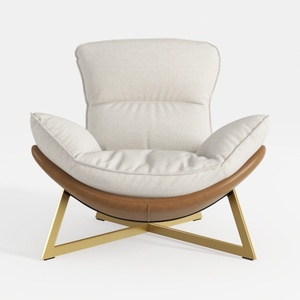
Modern Linen Leather Gold Metal Accent Armchair 3D Model
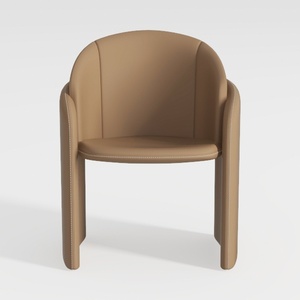

Minimalist Tan Leather Upholstered Armchair 3D Model

Modern Fabric Modular Ottoman Coffee Table Set 3D Model
If you're looking to transform your space, Homestyler is your go-to solution! This user-friendly platform features a powerful online design tool, impressive 3D renderings, and a wealth of design projects and DIY video tutorials. Bring your home design dreams to life effortlessly!
Concevez maintenant gratuitement
































