

I've crafted numerous printer corners, ranging from small apartments to efficient team spaces. A well-designed small printer table addresses issues like vibration, cable clutter, and accessibility while maintaining an understated elegance. In efficiently managed workplaces, printing areas cover only about 1–2% of the total floor space yet cater to the entire team—hence, the details are crucial. Research by Steelcase indicates that clearly defined workflow areas can lead to fewer micro-distractions and enhanced concentration; their findings suggest that proper proximity planning can save several minutes of transition time daily. Furthermore, the WELL v2 standard promotes minimizing noise and particulate exposure around equipment through thoughtful placement and filtration, underscoring the notion that a compact printer table can carry a significant influence.
From an ergonomic perspective, Herman Miller recommends that commonly used items be within a reach of 400–500 mm from a person's primary stance to avoid awkward movements; ideally, the top of a printer table should be 710–760 mm high for standing use or 630–680 mm for under-desk models. IES lighting standards advise that task areas, such as paper trays and access panels, should receive between 300–500 lux while minimizing glare to prevent misfeeds and eye strain. I've noticed that simply introducing a low-glare LED strip beneath the table edge can significantly reduce error rates and accelerate the process of clearing jams. When it comes to color choices, according to Verywell Mind’s research on color psychology, using cool neutral tones can help create a perception of less clutter—making them perfect for printing corners.
Minimal Footprint: Slim U-Frame Printer Table
Constructed from powder-coated steel, a slim U-frame with a 16–18 mm compact laminate surface offers durability without overwhelming visual space. Aim for a footprint of around 400–500 mm in width and 300–400 mm in depth for small home printers. Including a rear cable spine and a shallow under-shelf for reams is essential; avoid shelves deeper than 120 mm as they can be a tripping hazard. Adding a small edge radius (R3–R5) helps prevent chipping and provides a softer contact in high-traffic areas.
Dual-Level Micro Station with Paper Drawer
An innovative stacked design enhances workflow: the top shelf accommodates the printer, while a lower enclosed drawer serves for paper and cartridges. Incorporating a soft-close drawer at a depth of 250–350 mm keeps dust away. Ensure the back is vented with slots measuring 12–15 mm to allow heat dissipation. For those needing to simulate space planning, tools like Homestyler can help visualize clearances for access doors and front trays effectively.
Mobile Cart with Locking Casters
With casters rated for 40–60 kg per set, vibration is minimized. Opt for two front locking casters to avoid movement during intensive printing. A dead-front cable bay conceals power strips, and I recommend a 45° grommet for neat cord management leading to wall outlets. To enhance acoustic comfort, line the cart's side panels with 3–5 mm PET felt to absorb motor noise without hampering airflow.
Wall-Mounted Fold-Down Shelf
In constrained spaces like narrow hallways, a fold-down shelf with stainless steel hinges and gas struts conserves precious floor area. This shelf should be constructed from at least 12 mm thick compact laminate or plywood with a phenolic surface to withstand heat and moisture emitted from the printer. Position the shelf at a height of approximately 1,000–1,050 mm above the finished floor if you intend to stand while retrieving prints, ensuring a 150 mm clearance behind for cable loops.
Corner Printer Niche with Vertical Organizers
Utilizing a triangular or chamfered top allows this design to fit snugly into a corner, with a straight front edge facilitating access to trays. Incorporate vertical file dividers to organize labels, envelopes, and specialty paper. A matte, low-sheen finish (≤10 GU) can help reduce reflections that might otherwise create a sense of clutter. Ensuring the niche remains separate from seating areas is consistent with WELL v2 principles aimed at minimizing equipment noise where people concentrate.
Hidden Under-Desk Pull-Out
This sturdy pull-out drawer (rated for 30–45 kg) transforms spare knee space into a printer station. Use full-extension runners for easy maintenance, ensuring 75–100 mm side clearance to promote airflow and allow freedom for cable movement. For optimal seated ergonomics, the front tray should be within 400 mm of a neutral reach; deeper setups may lead to uncomfortable twisting.
Slim Cabinet with Rear Vent and Filter Slot
Certain laser printers emit gases during operation. A cabinet featuring a rear vent with a replaceable fine filter helps improve air quality and adheres to WELL's focus on managing pollutants. Keeping the cabinet's internal temperature below 35°C is crucial; achieve this by ensuring proper cross-ventilation using side louvres coupled with a gap at the back panel. Acoustic pads at the base can further decrease resonance.
Scandi Aesthetic: Birch Ply with Exposed Edge
A birch plywood finish with water-based polyurethane provides a warm finish and long-lasting durability. Pair it with white powder-coated legs and soft gray cable management solutions. This design achieves visual rhythm by allowing the birch edges to traverse as fine lines against a soothing color palette. Using calming cool tones in printer corners helps diminish the feeling of clutter and fosters better focus, a conclusion supported by findings in color psychology.
Tech-Ready: Docking Shelf and Charging Rail
Incorporate a streamlined charging rail for powering scanners or label printers. Utilize a 3-outlet surge protector nestled in a side pocket, featuring 90° plug heads to reduce protrusion. Ensure the presence of a cable bay measuring at least 60×60 mm for coiled cord management. Labeling the underside with a QR code can streamline quick maintenance references and toner model identification.
Material Choices That Work Hard
Opt for materials such as compact laminate, HPL-faced plywood, and anodized aluminum, which can withstand heat and minor abrasions caused by paper dust. Utilize PET felt and cork panels to provide acoustic dampening without a clinical appearance. Avoid shiny surfaces near print heads; glare complicates both paper handling and troubleshooting. Choosing FSC-certified wood helps achieve sustainability goals while minimizing off-gassing.
Lighting for Error-Free Printing
Aim for illumination between 300–500 lux in the area around trays and access points for jam clearance; adding a low-UGR task light helps maintain clear visuals on sensors. IES suggestions on effective task lighting promote a balanced vertical illuminance, meaning that a gentle wall wash can be beneficial in corner settings. Personally, a slender 3000–3500K LED strip positioned under the table edge has significantly reduced misfeeds more effectively than any accessory.
Smart Layout and Clearances
When planning your layout, consider the extension of the front tray, the rear cable arc, and the side swing of jam doors. As a guideline, allow 150–200 mm behind for cables and at least 250 mm in front for tray movement. If you find yourself mapping a compact studio or small office, utilizing a space planner ensures that these dimensions are accounted for before making any purchases.
Workflow Cues and Zoning
Establish the printer zone using a subtle floor mat or contrasting material base. Keep essential consumables directly below or adjacent to the printer to minimize transition times; Steelcase’s studies consistently endorse the logic of adjacency to lessen cognitive strain. A straightforward color coding system—using gray for cartridges and white for paper—can streamline the resupply process.
- Table height: 710–760 mm (for standing) or 630–680 mm (for under-desk use)
- Top size suitable for compact printers: 400–500 mm W × 300–400 mm D
- Rear clearance: 150–200 mm for cables
- Front clearance: ≥250 mm for tray movement
FAQ
Q1: What height should a small printer table be?
A1: For optimal standing access, aim for a height of 710–760 mm; for under-desk pull-outs, 630–680 mm is recommended. These dimensions correspond with ergonomic research on reach zones.
Q2: How much lighting is needed around the printer?
A2: Aiming for 300–500 lux around trays and access ports with glare control is essential. This follows recommended IES guidelines for task lighting and works to lower error rates during maintenance.
Q3: Which materials are best for heat and dust resistance?
A3: Compact laminate, HPL-faced plywood, and anodized aluminum are excellent choices as they resist heat and paper dust abrasion. Additionally, PET felt adds acoustic benefits without restricting airflow.
Q4: Are mobile printer carts stable enough?
A4: Certainly, provided they feature casters rated for 40–60 kg each, along with at least two locking casters. Pair these with a rigid frame to dampen vibrations during high-volume printing.
Q5: What is the best way to manage cables neatly?
A5: Implement a rear cable spine, 45° grommets, and a concealed cable bay for power strips. Maintain a rear clearance of 150–200 mm to avoid tight bends that can stress cables.
Q6: Is it safe to place a laser printer in a closed cabinet?
A6: Yes, as long as you install rear and side vents, keeping internal temperatures below ~35°C. A removable filter can significantly enhance air quality, aligning with WELL v2 guidelines.
Q7: What footprint is ideal for small apartments?
A7: Compact printers generally function well on a surface area of 400–500 mm wide and 300–400 mm deep. Ensure that the front has a clearance of at least 250 mm for tray movement.
Q8: Can color selections influence the perception of clutter?
A8: Absolutely. Utilizing cool neutrals and low-sheen finishes can reduce visual noise, corroborated by insights from color psychology literature and confirmed through my practical experience.
Q9: How close should the printer be to the main workspace?
A9: It should be near enough to minimize transition times yet distanced adequately to avoid disturbances in concentrated work areas. Research from various workplace studies supports this adjacency rule while considering acoustic comfort.
Q10: Any suggestions for minimizing noise in the print area?
A10: Consider adding 3–5 mm PET felt panels, isolating the printer table from walls, and ensuring unobstructed airflow to keep fans from ramping up noise. Positioning the printer away from seating areas can also aid in noise reduction.
What began as an Autodesk innovation has evolved into a design platform used by more than 18 million people around the globe. Homestyler combines powerful rendering, an intuitive editor, and a vast furniture library to help you turn inspiration into photorealistic designs — whether you're redesigning a single room or planning an entire home.
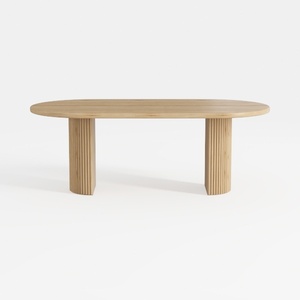

Minimalist Solid Wood Fluted Oval Dining Table 3D Model
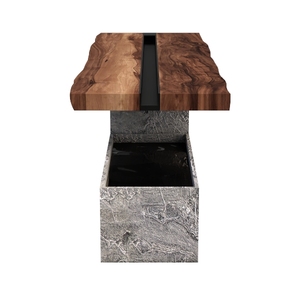
Rustic Live Edge Solid Wood Concrete Console Table 3D Model
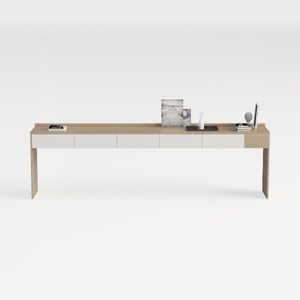
Minimalist Solid Wood Two Tone Console Table With Storage Drawers 3D Model
Discover the ultimate home design experience with Homestyler! This online platform offers an intuitive design tool, stunning 3D renderings, and a wealth of inspiring design projects. Plus, you can enhance your skills with helpful DIY video tutorials. Bring your dream home to life effortlessly!
Design jetzt kostenlos
































