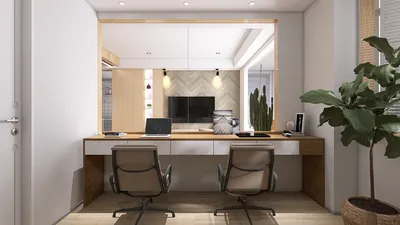


Clients frequently seek out small plants that can add cheer to a study desk without consuming too much space or diverting attention. The ideal selection should not only aid in concentration and mitigate glare but also introduce subtle elements of biophilic design. This approach transcends mere aesthetics; numerous studies have established a correlation between proximity to nature and enhanced well-being and productivity. According to research by Steelcase, individuals exposed to natural elements report a 15% increase in well-being and a 6% boost in productivity, providing a clear advantage, especially in compact home office environments. Furthermore, WELL v2 emphasizes the significance of biophilia and indoor air quality, highlighting how living plants contribute to overall comfort.
From the perspectives of lighting and ergonomics, small plants can effectively reduce micro-glare, provide visual pauses, and establish a stable focal plane on the edges of your workspace. As per IES standards, standard desk-related activities need an illumination level of 300–500 lux, and incorporating low-to-moderate light tolerant plants can help sustain comfortable brightness ratios on your desk. A select group of plants can also break visual monotony without creating clutter, thereby reducing your cognitive strain and sharpening your focus. Data from Steelcase and WELL supports the idea that environments enriched with natural elements promote improved mood and prolonged concentration.
Compact Plants Ideal for Your Desk
When selecting desk plants, I focus on those that are compact, exhibit slow growth, and have predictable lighting requirements. Here are some plant species that I frequently recommend for study spaces:
• Lighting needs: Thrives in low to medium indirect light, making it suitable for rooms with less than 300–400 lux of light away from windows.
• Characteristics: Displays upright, sculptural fronds with a glossy appearance, contributing to a visually pleasing vertical rhythm. Highly drought-resistant; requires watering every two to three weeks.
• Compatibility: Fits well with modern and minimalist desks, providing structure without overwhelming visual clutter.
• Lighting needs: Adapts to low to bright indirect light while maintaining a tight and architectural form.
• Characteristics: Features slow growth and stiff leaves that do not spill over onto the workspace.
• Compatibility: Ideal for those who may forget to water; pairs nicely with task lighting in the 400–500 lux range.
• Lighting needs: Prefers medium indirect light for optimal leaf variegation.
• Characteristics: Has a trailing growth habit that can be trained to ascend a small trellis to keep cables tidy.
• Compatibility: Softens the aesthetics and reduces glare from shiny screens; trim regularly to avoid unnecessary clutter.
• Lighting needs: Benefits from medium to bright indirect light.
• Characteristics: Compact rosettes with fleshy leaves creating a tidy appearance.
• Compatibility: Perfect for small shelves above your desk; tactile leaves introduce a subtle richness to the sensory environment.
• Lighting needs: Enjoys bright indirect light or gentle morning sun.
• Characteristics: A slowly growing succulent that requires infrequent watering.
• Compatibility: Suited for tight spaces and clean geometric layouts.
• Lighting needs: Prefers bright indirect light.
• Characteristics: Fenestrated leaves create visual interest; keep staked to prevent overgrowth.
• Compatibility: Adds character without allowing large leaves to dominate the desk space.
• Lighting needs: Thrives in low to medium indirect light while appreciating humidity.
• Characteristics: Displays striking vein patterns; requires consistent watering.
• Compatibility: Enhances color and texture in neutral work environments; optimal in a small self-watering planter.
• Lighting needs: Needs bright, indirect light.
• Characteristics: Grows in soil-free conditions; misting weekly is recommended.
• Compatibility: Convenient for cable management areas or can be attached to a monitor arm without taking up desktop space.
Guiding Light, Glare, and Color Psychology
Plants should complement your lighting strategy rather than conflict with it. Aim for a brightness of 300–500 lux at your workspace, as prescribed by IES guidelines, while keeping the color temperature between 3500–4100K to ensure alertness without harsh effects. The calming effect of green foliage serves as a reassuring stimulus; research from Verywell Mind describes the association of green with balance and restoration, a helpful concept during extended reading periods. If your lamp produces harsh reflections on glossy leaves, consider repositioning the plant away from the direct line of light to minimize glare.
Ergonomics: Clear Your Forearm Path
It’s vital that a plant’s footprint doesn’t disrupt main movement areas—such as reaching for the mouse, accessing notebooks, or adjusting the keyboard. I suggest positioning plants outside the main reach zone of 30–40 cm and keeping at least 10 cm of space behind the keyboard. Taller plants should be placed at the sides of the monitor to establish vertical symmetry without obstructing sightlines, while shorter rosettes can be situated in the far corners to soften the desk edges without intruding on your workspace.
Choosing Materials and Pots
Opt for matte, low-contrast planters to reduce micro-glare from task lighting. Untreated ceramics or powder-coated metal options featuring a small saucer help maintain cleanliness. From an acoustic perspective, strategically placed soft plantings alongside a cork mat underneath the pot can help soften tabletop vibrations, making the sounds of mechanical keyboards less pronounced. To experiment with various arrangements prior to purchasing, consider using an interior planning tool to visualize placements with a layout tool like Homestyler.
Watering, Maintenance, and Desk Cleanliness
Plants that require minimal care are ideal for desktops. I time “micro-care” sessions to coincide with weekly inbox cleanups, incorporating quick dusting of leaves, checking moisture levels, and trimming excess growth. Self-watering inserts are particularly beneficial for species like Fittonia and Pothos. It’s important to prevent overwatering; ensure saucers are dry within 30 minutes and keep soil levels 1–2 cm below the rim to avoid spills during sudden reaches.
Spatial Ratios and Visual Harmony
On compact desks measuring 100–120 cm wide, it’s best to limit your setup to one primary plant and one smaller accent plant. I often use a height ratio of 2:1 for this configuration: a 20–25 cm tall upright plant (like a ZZ or Snake plant) paired with a 10–12 cm rosette (such as Haworthia or Peperomia). This arrangement creates a rhythmic visual flow without feeling overcrowded. If you rely heavily on paper notes, consider replacing trailing species with upright variants to preserve horizontal writing space.
Work Habits and Plant Placement
For study sessions that demand deep concentration, place your greenery at the edge of your peripheral vision—either to the left or right of the monitor—ensuring it serves as a gentle anchor rather than a focal point. On days with significant video conferencing, it’s advisable to position plants out of the direct line of the webcam to minimize distractions caused by leaf textures. For night owls, select plants that can endure cooler color temperatures and low light conditions, like ZZ plants and Snake plants.
Sustainability and Indoor Air Quality
Although small plants have a limited effect on air quality, their real advantage lies in encouraging regular breaks and care routines that enhance focus. The WELL v2 frameworks stress the importance of proper ventilation and safe materials; it’s advisable to pair plants with low-VOC finishes and ensure adequate air circulation rather than relying solely on them to ‘purify’ the air. Choose plants that are easy to propagate (such as Pothos or Peperomia) to enrich your setup without the need for additional purchases.
Quick Plant Placement Ideas
• Minimalist arrangement: One Haworthia in a matte white pot placed at the right side of the monitor, under a 4000K task light.
• Study-focused configuration: ZZ plant in the rear corner for vertical balance, with a small Peperomia near the desk lamp to soften lighting effects.
• Creative layout: Pothos trained to grow vertically beside a bookshelf, with Fittonia placed near a notepad to provide tactile contrast.
Frequently Asked Questions
Maintain the task lighting around 300–500 lux per IES recommendations and angle your lamps to prevent direct reflections on glossy leaves. Indirect lighting not only supports leaf health but also lessens glare.
ZZ plants and Snake plants are excellent for low-light conditions. Haworthia tolerates bright indirect light but can survive with lower levels if watering is reduced.
Place plants outside the primary reach zone of 30–40 cm and ensure taller varieties are located at the monitor's sides. Limit setups to one primary and one accent plant for compact desks.
Absolutely—Haworthia and smaller varieties of Sansevieria grow slowly, require minimal maintenance, and do not sprawl across work surfaces.
Access to natural elements is linked to better well-being and productivity; Steelcase indicates that environments infused with natural cues can yield up to a 15% boost in well-being and a 6% increase in productivity.
Use a color temperature of 3500–4100K to maintain alertness without harshness; temperatures cooler than 4100K may feel overly clinical, while those warmer than 3000K could lead to drowsiness during prolonged study sessions.
Most desk-friendly plants appreciate slightly drying out. ZZ and Snake plants typically need watering every 2–3 weeks; Peperomia and Fittonia thrive with weekly moisture, benefiting from self-watering inserts.
Choose matte ceramics or powder-coated metals to minimize shiny reflections. Avoid high-gloss finishes when lighting is strong to prevent glare.
Small plants and soft pads beneath pots can gently dampen surface reflections, making keystrokes sound less sharp; however, the effect is modest.
Most indoor plants are low in allergens. It’s wise to avoid highly fragrant flowering species on the desk; stick to ZZ, Snake, Haworthia, and Peperomia for best results.
Consider using a room design visualization platform, like Homestyler, to experiment with your desk layout and ensure proper clearances and sightlines.
Yes, plants can be vertically trained on a mini trellis. Ensure vines stay clear of writing spaces and trim monthly to keep edges tidy.
Discover the ease of home design with Homestyler! This intuitive platform offers a powerful online design tool, stunning 3D renderings, a wealth of design projects, and helpful DIY video tutorials. Whether you're a beginner or an expert, bring your vision to life effortlessly!
Design jetzt kostenlos
































