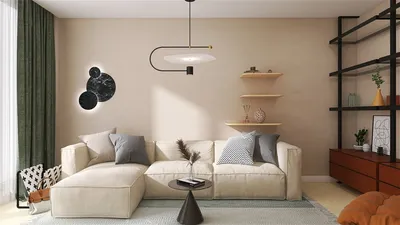


When designing compact living rooms, I liken the process to crafting small-scale architecture, where each inch is essential and must serve a purpose without overwhelming the space. Choosing the right TV stand can act as a cornerstone in the room, reducing visual clutter, providing additional storage, and ensuring that the floor space remains functional. It is often more critical to get the dimensions, cable management, and sightlines correct than to prioritize just the stand's aesthetics.
Research supports the significant role that effective storage plays in enhancing everyday comfort. A study by Steelcase indicates that visual disarray raises cognitive load, ultimately detracting from focus and perceived well-being. By minimizing visible items, one can achieve better concentration and tranquility. The WELL v2 guidelines propose maintaining glare management and an appropriate brightness balance to mitigate eye strain during screen time, while IES standards highlight the importance of controlled ambient lighting to prevent reflections—recommendations that directly affect how a TV stand can be designed with integrated lighting and finishes.
On a behavioral level, insights from Herman Miller's workplace research show that adjustable, modular furniture not only enhances flexibility but also boosts overall satisfaction. This same concept holds true in residential settings, particularly in smaller areas: furniture pieces that can adapt or conceal functions—such as media storage, books, or game consoles—facilitate the transition between entertainment and peaceful relaxation without the need for constant rearranging.
Choosing the Right TV Stand for Limited Spaces
The dimensions set the overall aesthetic. Aim for a TV stand that is as wide as or slightly wider than the TV to prevent a top-heavy appearance. Keep the depth of the unit below 16 to 18 inches to ensure a clear pathway. It's essential to allow at least 24 to 30 inches of space behind the seating and to position the screen so that the viewer's eye levels are about one third from the bottom edge when seated. Low-profile stands, standing between 18 to 22 inches tall, help maintain open sightlines, creating a more tranquil atmosphere in small rooms.
Utilizing Wall-Mounted Consoles and Floating Storage
Floating stands free up floor space and create a visually lighter feel. By positioning the unit 8 to 12 inches above the floor, you can tuck away items like baskets or even a vacuum underneath. Opting for continuous, handle-free fronts can also reduce visual distractions. For those contemplating a new layout, utilizing a room design tool like Homestyler can help visualize viewing angles, clearances, and cable placements before making any installations.
Maximizing Corner Spaces with TV Stands and Diagonal Sightlines
Corners often present an opportunity to make use of otherwise wasted space. A triangular or trapezoidal TV stand snugly fits into these areas, while angling the screen can decrease viewing distance without sacrificing comfort. Position the stand to prevent direct sunlight from hitting the screen and consider light-filtering shades to maintain an optimal luminance contrast range. Corner units with open backs make cable management simpler and ensure better ventilation for gaming consoles.
Incorporating Dual-Purpose Media Benches and Credenzas
For those with limited footprints, a bench-style media credenza can function as extra seating. It's wise to seek out designs with sturdy tops, ventilated rear panels for effective heat management, and soft-close doors to minimize noise. A continuous base can visually elongate the space, while legs with some clearance—about 6 to 8 inches—allow for visible flooring, making confined areas appear more spacious.
Embracing Slim Profiles with Vertical Storage
Tall and slender units can be placed alongside the TV to organize books, remotes, and routers while keeping the primary stand uncluttered. Ensure that upper shelves are kept shallow (around 8 to 10 inches) to avoid overwhelming the screen, and integrate cable channels vertically. Balance the visual weight by distributing storage evenly on both sides to achieve symmetry, reducing any perception of imbalance that could detract from a small space’s aesthetics.
Choosing Appropriate Finishes: Glass, Matte, and Low-Glare
The choice of finish can significantly affect comfort. High-gloss surfaces tend to reflect light and amplify screen reflections, while matte or satin laminates can reduce glare, allowing your eyes to rest more easily—aligning with IES recommendations for light control. Tempered glass doors can be functional if infrared remotes need to work through them, yet selecting smoked or textured finishes can help to lessen reflections.
Utilizing Color Psychology for Enhanced Visual Calm
Neutral mid-tones such as warm grays or desaturated olives can reduce the contrast with a black TV frame, allowing the unit to blend seamlessly into the wall. For very compact spaces, using analogous color palettes can help avoid harsh transitions; selecting a stand that is a tad darker than the wall can ground the visual composition without drawing too much attention. Accents in color can be integrated within the unit itself (for items like book spines or textiles) to keep the primary area serene.
Effective Cable Management and Ventilation Techniques
Maintaining good cable organization is crucial. Route power and signal cables separately to minimize interference, use grommets and raceways for concealment, and allow a couple of inches behind equipment for airflow. Adhering to manufacturer specifications helps ensure clear ventilation. For furniture situated close to heat sources, consider using wall-mounted options or raising the unit to prevent heat damage.
Enhancing Acoustics Around the TV Stand
Compact rooms often face challenges with echoes and bass issues. Implementing soft rugs and fabric panels near primary reflection points can help mitigate this, while perforated media doors can enhance sound clarity. If a soundbar is being used, mount it just below the screen with adequate clearance to avoid obstruction; avoid placing speakers inside closed cabinets unless they have been designed for acoustic ventilation.
Incorporating Hidden Storage Solutions: Drawers, Flip-Downs, and Tambour Doors
Hidden storage options keep items like remotes and game controllers organized. Flip-down doors with gas struts can serve as temporary surfaces for electronics, and drawers with full-extension slides ensure back-row accessibility. Tambour doors are especially useful in compact settings where swing space is limited, offering a subtle texture without adding visual weight.
Micro-Living: Strategies for Narrow Rooms
In studio apartments, it's beneficial to orient the TV stand in line with circulation routes instead of seating if the couch must be positioned away from a wall. Align the stand along the longest wall to optimize depth, and opt for a low, wide unit that can help delineate the living area. Using a layout planner such as Homestyler can assist in assessing walking paths, door clearances, and the equilibrium of storage against open display.
Selecting Durable Materials with an Eye on Sustainability
Choose materials like FSC-certified plywood, water-based finishes, and modular setups that can be repaired or replaced effectively. Solid wood edges are advantageous as they hold up against dings in tighter environments better than thinner veneers. If weight is a concern for wall mounting, lightweight honeycomb boards can provide strength without added bulk.
Integrating Lighting for Enhanced Viewing Comfort
Implementing bias lighting behind the screen can decrease eye strain by softening the contrast between the display and surrounding space. Opt for dimmable LED strips in the range of 2700 to 4000K and avoid direct visibility of diodes. Conceal task lighting within the stand for easy access to devices; ensure a Color Rendering Index (CRI) over 90 for accurate color recognition on decorative elements. Additionally, it is good practice to maintain the capability to darken windows during daytime viewing in compliance with glare reduction methods as recommended by WELL v2.
Achieving Style without Clutter
When styling, keep it minimal: one focal decorative item (like a low bowl or a sculpture) paired with one vertical accent (such as a small plant or a candleholder) suffices. Store remote controls inside drawers and keep charging stations out of sight. The top of the stand should appear as a calming surface rather than a repository for miscellaneous items.
Budget-Friendly Enhancement Ideas
Consider replacing hardware with sleeker pulls, adding cable grommets, or installing adhesive LED bias lights. Switch out mismatched baskets for uniform containers that fit the shelves well. If the stand appears slightly too deep, adding a narrow top with a beveled edge can visually minimize its depth while safeguarding corners.
Thoughtful Placement: Regarding Windows, Radiators, and Doors
Position the stand directly across from seating, but make sure it’s offset from sunlight to reduce glare. Ensure to maintain adequate clearance for door swings and avoid obstructing wall outlets; consider installing floor outlets to minimize cable runs across high-traffic areas. In petite spaces, a sliding door on the unit can be a wise upgrade to prevent congestion in tight pathways.
Design Checklist for Compact TV Stands
- Keep the depth under 18 inches; height around 18–22 inches ensures comfort and accessibility
- Favor matte finishes and controlled lighting to cut down on screen glare
- Implement concealed cable channels, ventilated backs, and thoughtful power management
- Maintain a storage mix: 50–70% concealed and 30–50% open based on your usage patterns
- Opt for neutral, low-contrast color schemes to create a calmer environment
- Consider floating or corner-mounting to maximize floor space wherever possible
Frequently Asked Questions
Q1: What is the ideal width for a TV stand in relation to the TV?
A: It is recommended to match or exceed the width of the TV by a couple of inches to ensure balance and prevent the risk of tipping, keeping edges protected.
Q2: What should be the optimal viewing height in small living areas?
A: Ideally, set the screen so the seated eye level aligns with the lower third to middle part of the display; low stands (around 18 to 22 inches tall) usually meet this requirement without obstructing views.
Q3: How can I lessen screen glare in well-lit rooms?
A: Opt for matte finishes, install bias lighting between 2700 to 4000K, and utilize light-filtering shades. Position the screen away from direct sunlight to adhere to glare management methods highlighted by WELL v2 and IES.
Q4: Are floating TV stands safe for heavier televisions?
A: Yes, as long as they are secured to studs using appropriate brackets and load ratings. Ensure that the unit has adequate ventilation for components and includes cable channels for strain relief.
Q5: What is the best approach for storage solutions in confined areas?
A: Aim to have mainly concealed storage (about two-thirds) for devices and remotes, leaving limited open display to avoid the visual clutter that can heighten cognitive load according to Steelcase studies.
Q6: Can a corner TV stand enhance the flow of the room?
A: Indeed, corner placement can reduce viewing distance and may free up the longest wall for seating or shelving, while minimizing direct window reflections.
Q7: What are some effective strategies for managing cables without drilling?
A: Consider using adhesive raceways, under-rug cable channels in infrequently crossed paths, and grommet-covered boxes within the stand. It’s best to keep power and data lines distinct to reduce interference.
Q8: What materials offer durability for small, frequently used areas?
A: Look for plywood with solid wood edges, high-pressure laminate with matte textures, and tempered glass for IR-friendly accessibility. Seek components that can be repaired to prolong the lifespan.
Q9: Is it advisable to place a soundbar inside the stand?
A: It is preferable to mount the soundbar just below the TV with sufficient clearance for audio clarity. Closed cabinets may muffle sound unless designed with acoustic ventilation.
Q10: What are effective strategies for keeping the stand’s surface from becoming cluttered?
A: Limit the surface decor to one horizontal focal piece and one vertical accent. Store charging docks and remotes in drawers to allow the top to remain a calm, unobtrusive surface.
Homestyler's roots trace back to Autodesk, the global leader in design and engineering software. That heritage lives on in every feature we build. Today, with a community of more than 18 million users worldwide, Homestyler continues to make professional-quality interior design accessible to everyone — from first-time decorators to seasoned architects.
Transform your space with Homestyler! This user-friendly online home design platform offers a versatile design tool, stunning 3D renderings, and a plethora of design projects. Plus, learn through engaging DIY video tutorials. Unleash your creativity and bring your design visions to life effortlessly!
Design Now for FREE
































