


Tropical Style Unpacked: Design Language of Sun & Jungle
The Homestyler "TropicalStyleContest" centers on a relaxed, resort‑like tropical vibe: think Maui beaches, Bali suites, lush courtyards and garden bathrooms wrapped in greenery. In interior design terms, tropical style combines saturated natural colors, abundant plants, light‑filled open layouts and textures drawn from rattan, wood and stone to recreate a holiday oasis at home.
Unlike coastal or Mediterranean interiors that may be cooler and more minimalist, tropical spaces lean into visual richness and sensory layers: bold foliage prints, organic materials, indoor–outdoor transitions and water or spa elements. The winning projects like "Maui, Hawaii." and "The tropical courtyard" show how the style can be applied to living rooms, courtyards, suites and bathrooms while keeping a coherent, immersive atmosphere.
In Homestyler, this style is easy to build: use the 3D rendering tool to combine plant models, outdoor structures, warm lighting and material libraries (wood, stone, woven fibers) and preview them in realistic daylight to fine‑tune the tropical atmosphere before any real construction.

Matty’s "Cabane tropicale" presents a cabin‑like tropical retreat that captures the essence of the contest theme: compact structure, strong natural texture and enveloping greenery. In Homestyler you can quickly achieve a similar look by combining cabin wall presets, wood materials and the tropical plant library, then testing different daylight settings in the 3D rendering viewport.
🌈 Color & Light Palette
Tropical interiors are built on a warm, vibrant yet balanced palette. Core hues are inspired by nature: deep jungle greens, palm leaf tones, sunlit yellows, coral and hibiscus pinks, ocean blues, plus grounding neutrals like sand, beige and warm wood. Light plays a major role; spaces feel open and sun‑kissed rather than dim.
In Homestyler, start with neutral base surfaces (walls and floors) and layer color strategically through textiles, accent walls and decor. Use 3D rendering to simulate natural daylight and golden hour lighting, adjusting brightness and color temperature until the room feels like late afternoon in the tropics instead of a generic warm scheme.

Pritha Samanta’s "🌿" showcases a controlled tropical palette: lush greens take center stage, supported by soft neutrals and warm light. The result feels fresh rather than overwhelming. In Homestyler you can mirror this by assigning green accents to plants and cushions, keeping envelope surfaces pale, and using the lighting editor to create a gentle, filtered sunlight effect.
🏝 Spatial Flow & Indoor–Outdoor Connection
A core feature of tropical style is the blurred boundary between interior and exterior. Courtyards, terraces, semi‑open bathrooms and suites with large openings create a continuous spatial flow. Circulation is simple and relaxed; you move from living areas to garden or water features almost without noticing a threshold.
In Homestyler’s 3D floor planner, this is achieved by designing generous openings, connecting rooms to balconies or courtyards, and inserting outdoor zones directly onto the same canvas. The rendering tool lets you preview how sky light and greenery outside affect the interior, so you can optimize views, door positions and sight lines for a true resort‑like feeling.

KE Kegan’s "Earthy Living" integrates seating, greenery and earthy materials in a way that suggests a seamless indoor–outdoor living area. In Homestyler you can replicate this by placing living room furniture close to openings, using stone or timber that continues from interior to exterior, and adding planters or trees positioned so they visually extend into adjacent outdoor perspectives in the render.
🌿 Materials, Textures & Decor Layers
Tropical style relies on tactile richness: rattan and wicker, raw or lightly finished wood, stone, linen, cotton, and occasional metallic accents. Decor often includes oversized plants, botanical prints, hand‑woven baskets, carved elements and spa‑like features such as freestanding tubs or outdoor showers. The key is layering textures without cluttering the space.
In Homestyler, the material library and model catalog make it easy to explore these textures. Apply rattan to chairs and pendant lamps, select wood grains with warm undertones for furniture and floors, and drag in plant and decor models to test different densities of greenery. 3D rendering will reveal how each surface responds to light, helping you refine the mix until the room feels lush but still breathable.

chrissy W’s "Tropic Retreat" layers plants, textiles, wood and possibly rattan into a cocooning retreat. The textures invite touch but remain visually coherent. Using Homestyler, you can study this kind of layering by switching between material options, duplicating decor elements and rendering from multiple viewpoints to ensure the composition feels balanced from every angle.
FAQ & Tips
Q: How do I quickly build a tropical interior in Homestyler?
Q: Which elements are essential so the style reads as "tropical"?
Q: I have a small apartment. Can tropical style still work?
Q: How accurate is Homestyler’s 3D rendering for planning real tropical materials?
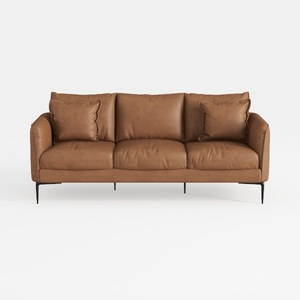
Modern Minimalist Brown Leather 3 Seater Sofa With Black Metal Legs 3D Model
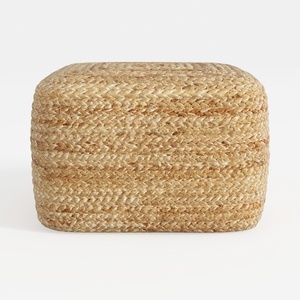
Natural Rattan Woven Square Ottoman 3D Model
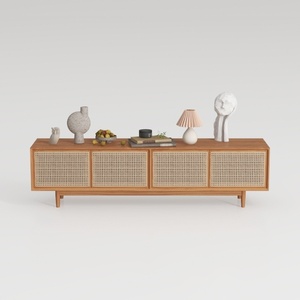
Minimalist Japandi Solid Wood Cane TV Cabinet 3D Model
Homestyler is an easy-to-use online home design platform offering powerful 3D rendering, a vast collection of interior design projects, and helpful DIY video tutorials. It’s perfect for anyone looking to create and visualize stylish home layouts effortlessly.
Design Now for FREE