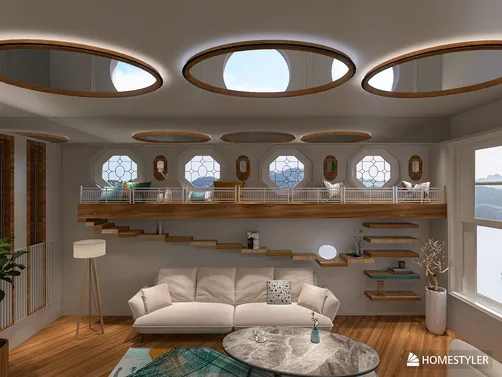
Illusion-Driven Interior Space Design
This design scenario centers on creating perceptual illusions within residential or commercial interiors—using architectural tricks, material contrasts, lighting choreography, and spatial layering to manipulate how users experience scale, depth, direction, and proportion. Rather than expanding physical square footage, the goal is to expand *perceived* space: transforming a compact 50㎡ layout into a visually expansive 100㎡ environment through intelligent indoor space planning and visual psychology. It merges art, architecture, and digital design tools—especially Homestyler’s real-time 3D rendering—to prototype, test, and refine illusion-based spatial narratives before execution.
Design Challenges & Common Pitfalls
Key challenges include balancing visual drama with functional livability; avoiding disorientation or motion-sickness effects from excessive tilt or distortion; maintaining structural clarity while introducing ambiguity; and ensuring illusions remain legible and intentional—not confusing or gimmicky. Common pitfalls include overloading surfaces with competing patterns, misaligning light/shadow cues across viewpoints, neglecting human ergonomics in tilted or mirrored layouts, and failing to simulate realistic material reflectivity or HDR lighting in Homestyler AI design tools—leading to discrepancies between render and reality.
✅ Strategic Use of Mirrors & Reflective Surfaces
Mirrors are not just decorative—they’re spatial amplifiers. Strategically placed full-height mirrors, mirrored ceiling panels, or reflective flooring can double perceived depth, extend sightlines, and dissolve boundaries between zones. Avoid centering mirrors directly opposite cluttered areas; instead, align them with focal voids (e.g., a blank wall beside a window) or angled to reflect sky or greenery. In Homestyler, use the 'Material Reflectivity' slider and HDR environment maps (e.g., 'g_ljz_day') to preview realistic reflections before rendering.

Linda H’s 'Illusion Home – we’re not in Kansas anymore 👠👠' uses tilted walls and asymmetric mirror placement along sloped ceilings to destabilize gravity perception—yet maintains comfort via ergonomic furniture scaling and soft ambient lighting (HDR: lilienstein). She leveraged Homestyler’s multi-angle camera navigation and real-time shadow casting to verify that illusions remained coherent from all primary viewpoints—not just the hero render.
Design Your Dream Room🌀 Purposeful Architectural Distortion
Tilted floors, cantilevered volumes, faux windows, and non-orthogonal partitions disrupt expectations—and invite curiosity. The key is *controlled inconsistency*: introduce one dominant distortion (e.g., a 7° wall lean) and anchor it with strong horizontal lines or consistent material transitions elsewhere. Faux windows should cast believable shadows and match surrounding light temperature; avoid flat decals—use Homestyler’s custom decal tool with depth-mapped transparency for layered realism.

PG studio’s 'White Lotus Bureau' employs dramatic stair geometry and recessed faux-window niches with integrated LED strips to imply external views where none exist. Using Homestyler’s Sunlight Control and custom IES light profiles, they calibrated directional shadows to reinforce the illusion of daylight ingress—even in an interior-only floorplan—demonstrating advanced indoor space planning through light logic rather than literal openings.
Start Free Design Now✨ Layered Light & Shadow Composition
Light and shadow are the most persuasive illusion tools—more powerful than color or texture alone. Use layered lighting: ambient (ceiling), task (under-cabinet), and accent (wall washers, spotlights) to sculpt volume. Introduce subtle chiaroscuro—e.g., a narrow vertical strip of light beside a tall mirror—to suggest height; or dappled shadow patterns (via laser-cut screens) to imply depth beyond a solid wall. In Homestyler, combine multiple light sources with different temperatures and intensities, then preview under various HDR environments ('moonlit_golf', 'g_sea_sky') to ensure illusion consistency across time-of-day conditions.

Graca Doutel’s 'Small WC' transforms a 16.4㎡ bathroom using mirrored walls, linear LED coves above and below vanity, and a single suspended pendant casting elongated vertical shadows—creating rhythmic repetition that visually stretches the room. She used Homestyler’s real-time ray-traced preview to adjust light falloff and mirror edge blending, proving how precise Homestyler design techniques enable micro-scale illusion mastery in constrained spaces.
Begin Your Free DesignFAQ
Q: Can illusion-based designs work in real-world construction—or are they only for renders?
Yes—many top-winning entries (e.g., Amy ✨’s 'Architectural Balance') translate directly to buildable plans. Key is grounding illusions in structural honesty: tilted walls use tapered framing; faux windows integrate actual skylights or fiber-optic daylight simulators. Always validate proportions and clearances in Homestyler’s dimensioning mode before handoff to contractors.
Q: How do I avoid making a small space feel disorienting instead of spacious?
Prioritize one illusion per zone (e.g., mirror expansion in living area, ceiling slope in hallway)—never stack distortions. Maintain consistent floor materials and horizon lines. Use Homestyler’s ‘Walkthrough Mode’ to simulate human movement and identify jarring transitions early.
Q: Which Homestyler AI features are essential for testing illusion effectiveness?
Critical tools include: Multi-HDR Environment Toggle (to verify light consistency), Real-time Shadow Casting (for faux window accuracy), Reflectivity Material Editor, and Camera Angle Presets (front/side/top/isometric). Also use ‘Render Comparison Mode’ to A/B test illusion variations side-by-side—vital for refining indoor space planning decisions.


Homestyler offers an easy-to-use online design tool with stunning 3D renderings, inspiring design projects, and helpful DIY video tutorials. It’s ideal for turning your home design ideas into reality quickly and creatively. Give your space a fresh new look with Homestyler!
Zaprojektuj teraz za darmo