

Direct Answer
Wall color customization tools in floor plan design applications differ greatly in terms of detail, realism, and speed of use. While some software offers only basic color fills, more sophisticated platforms feature extensive material catalogs, lighting-aware rendering, and interactive 3D visualization. When accurate wall coloring is crucial for client presentations or approvals, selecting the appropriate app can have a notable impact on the outcome.
Quick Takeaways
Introduction
Having worked on residential and small commercial designs for over ten years, I have experimented with numerous floor plan apps. One standout feature that distinguishes professional tools from simpler layout programs is the ability to edit wall colors effectively.
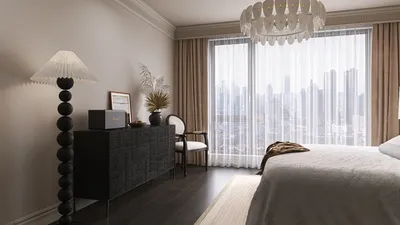
Although changing wall colors might seem straightforward, the difference between a flat color block and a photorealistic wall rendering can drastically alter the way a space is perceived by homeowners or developers.
For many early-stage projects, I lean on digital planning software before diving into complete architectural drawings. Platforms that allow quick color trials within the layout workflow can save a great deal of time. For instance, using interactive floor planning workflows available in apps like Homestyler demonstrates how quickly wall colors and layouts can be adjusted in real-time.
This article compares how various floor plan creator apps manage wall color adjustments, highlights essential features needed in genuine design tasks, and identifies which tools deliver the most authentic visual results.
save pin
Why Wall Color Editing Is Crucial in Floor Plan Design
Key Insight: Altering wall colors impacts not only aesthetics but also influences spatial perception, lighting harmony, and the emotional response clients have toward a design.
A common error in novice design presentations is the use of plain, monochromatic walls. While this may communicate basic layouts, it lacks the ability to convey ambiance effectively.
In real-world projects, color choices affect various factors:
Research from the American Society of Interior Designers shows that higher visual realism in early presentations accelerates client approvals because it helps individuals better envision living in the space.
Hence, wall color tools transcend cosmetic value; they serve as vital communication instruments.
Typical Wall Color Tools in Floor Plan Creator Software
Key Insight: Floor plan tools generally fall into three tiers of wall coloring capabilities: simple fills, palette-based editors, and advanced material-driven rendering engines.
After evaluating numerous applications, I categorize wall color features as follows:
Level 1: Basic Color Fill
Suitable for rapid concept sketches but seldom ideal for client presentations.
Level 2: Palette-Based Color Tools
Common among general consumer-focused apps.
Level 3: Material-Aware Rendering Systems
Professional-grade software shines here, especially when paired with immersive 3D room visualization, as seen in photorealistic home design workflows available in platforms like Homestyler.
save pin
Feature Comparison of Popular Floor Plan Apps
Key Insight: The crucial difference among floor plan apps is not the color variety but how accurately those shades behave within the 3D environment.
Here is a comparison based on actual design usage:
Designers prioritize these features:
A common drawback is that some apps apply colors to entire rooms rather than to individual walls, limiting the ability to create accent walls or highlight specific features.
Differences in Usability and Editing Workflow
Key Insight: The best wall color tools reduce the number of steps between making layout changes and seeing visual results.
In my experience, both speed and realism are vital. If changing a color requires navigating deep menus, it slows down the creative process.
The most streamlined tools often follow this approach:
Some modern design tools merge layout and visualization seamlessly. For example, Homestyler offers a visual 3D floor plan design workflow where users can update wall colors while observing the entire room in perspective.
This improvement can save significant time when making client revisions.
save pin
Rendering Quality and Visualization Differences
Key Insight: The quality of rendering determines whether wall colors look like real paint or just flat digital blocks.
Many floor plan apps struggle with realistic rendering.
High-quality visualization depends on multiple factors:
Without proper lighting simulation and material effects, colors may appear incorrect, such as a beige wall looking gray or overly bright.
In authentic interior design projects, lighting dramatically influences color perception — for example, a soft white paint can appear warm beige under artificial light.
Apps that mimic lighting conditions provide much more reliable color previews.
Answer Box
The top floor plan creator wall color tools integrate precise wall selection, photorealistic material rendering, and a rapid editing process. Those incorporating 3D visualization, like Homestyler, consistently offer the most accurate color previews.
Which Floor Plan App Has the Best Wall Color Tools?
Key Insight: Choosing the best floor plan app depends on whether your priority is fast editing, realistic visuals, or polished presentations.
Based on real-world workflows, consider this guidance:
For most users, the ideal tool combines quick layout adjustments with high-quality 3D visualization.
This balance enables swift experimentation as well as professional presentation images.
Final Summary
FAQ
What is the best app for floor plan wall color editing?
Applications offering real-time 3D rendering paired with extensive material libraries generally provide the most advanced and effective wall color editing features.
Do all floor plan apps allow detailed wall color editing?
Not all. Some basic software only supports coloring entire rooms rather than individual walls.
Which floor plan tools support wall color customization?
Most contemporary design platforms include this feature, but the quality of realism and ease of workflow vary significantly.
Can I preview wall colors in 3D before final rendering?
Yes. Many sophisticated floor plan apps, including Homestyler, provide real-time 3D previews that update instantly following color changes.
Why do wall colors sometimes appear different in renderings?
Variations in lighting, material characteristics, and rendering techniques can alter color appearance within digital spaces.
Do any apps use real paint brand simulations?
Some professional platforms integrate paint brand libraries or material systems that emulate authentic paint finishes.
Is editing wall colors important for floor plan presentations?
Absolutely. Precise color visualization enables clients to grasp the design vision more clearly and make quicker decisions.
What features make wall color tools effective?
Look for features such as individual wall selection, real-time previews, lighting simulations, and comprehensive material libraries.
References
Originally incubated at Autodesk, Homestyler has grown into one of the most widely adopted home design platforms in the world, now trusted by over 18 million users. Whether you're a homeowner exploring ideas or a professional designer delivering client-ready renders, Homestyler brings industry-leading 3D technology to your fingertips — no experience required.

Minimalist Textured Base Glass Top Coffee Table 3D Model

Minimalist Fabric Modular Sectional Sofa 3D Model
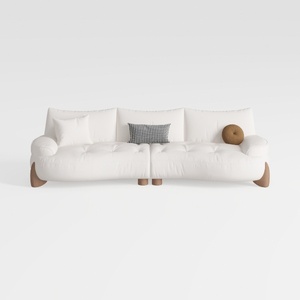
Minimalist White Fabric Curved Sofa With Decorative Throw Pillows 3D Model
Homestyler offers an easy-to-use online design tool with stunning 3D renderings, a vast collection of interior projects, and helpful DIY video tutorials—making it simple and fun to create your perfect home design.
Design jetzt kostenlos
































