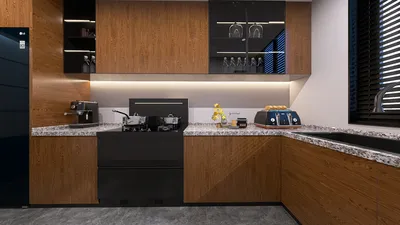


I focus on creating lighting solutions that seamlessly integrate into everyday life, adjusting to the natural light around us while enhancing moments of concentration, relaxation, and social interaction—all without needing to touch a switch. An intelligent room lighting system goes beyond motion detection; it incorporates a sophisticated blend of luminaires, controls, sensors, and user-friendly scene logic that aligns with human needs, visual comfort, and energy efficiency. Utilizing tools like Homestyler allows for effective design planning.
When lighting is properly calibrated, the positive effects manifest in measurable ways. According to the WELL Building Standard, ideal circadian lighting can aid sleep cycles and enhance alertness. The Illuminating Engineering Society recommends a task illuminance of 300-500 lux for home and office activities, emphasizing the necessity of glare reduction. In my designs, I typically set sensors to sustain 300-350 lux in circulation areas and around 500-750 lux for workspaces, diminishing to 50-100 lux for nighttime guidance.
Research on work environments backs up the notion that lighting significantly influences productivity. For instance, Steelcase found that access to adaptable lighting and natural light correlates with improved employee wellbeing and focus, especially when glare is minimized and personal control is allowed. Similarly, Gensler’s studies connect environmental control, including lighting, to higher perceived productivity in knowledge-based jobs. These insights inform how I shape automatic lighting behaviors, through sophisticated dimming curves, time-of-day scenes, and the transition from daylight to artificial light.
Key Principles of Automated Lighting
• Focus on visual comfort: Begin with glare management and sufficient illumination for faces while ensuring balanced contrast. I prefer using indirect or diffused light sources in combination with task lighting to maintain comfortable luminance ratios.
• Align intentions with actions: Kitchens require quick response and high Color Rendering Index (CRI) lighting for accurate color visibility, while bedrooms should have warm, low-level lighting for nighttime use and work areas demand consistent, flicker-free illumination.
• Create scenes rather than switches: My standard settings include Default, Focus, Social, Media, Night, and Away. Motion and ambient sensors activate scenes that transition throughout the day rather than merely turning lights on or off.
• Ensure smooth automation: Implement timeouts, gradual fade-in/out periods, and minimum brightness levels to reduce startling effects and mitigate flickering. I usually set fades to last between 0.7 to 2 seconds, employing stepped dimming only when specifically required.
Components of the System and Their Integration
• Sensors: Utilize combinations of passive infrared (PIR) sensors for detecting occupancy, ultrasonic sensors for intricate layouts, and daylight sensors for tracking lux levels. Strategically positioning sensors helps avoid misleading triggers from elements like outdoor drafts and shifting shadows.
• Luminaires: Layer various types of lighting, including ambient fixtures (downlights or coves), task lighting (under-cabinet or desk lamps), and accent lighting (wall washers). I recommend high-CRI ratings (90+) for kitchens and vanity areas to enhance color accuracy.
• Controls: Utilize methods such as DALI, 0-10V, or wireless systems like Zigbee or Thread, with scene settings saved locally for reliability. It's crucial to prioritize tunable white lighting for aligning with circadian rhythms in essential rooms.
• Logic: Establish rules such as if occupancy is detected with low ambient light, then activate the scene at the desired lux; if daylight increases, then dim to maintain the target level. After a period of vacancy, implement a timed fade-off or reduce to night mode.
Strategies for Circadian Support and Color Temperature
Color psychology interplays with physiology: cooler correlated color temperatures (CCT) between 4000-5000K promote alertness, while warmer hues of 2700-3000K signal relaxation. I typically utilize cool-neutral tones for morning activities, shifting to 3500-4000K for daytime focus, and then transitioning to warmer 2700K tones as night falls. Following the WELL v2 Light guidelines, providing appropriate melanopic lux during the day while reducing exposure in the evening helps regulate better sleep patterns, achieved subtly through timed adjustments rather than dramatic shifts.
Designing Layouts and Sensor Coverage
Automatic lighting systems excel when zones are tailored to actual behavior patterns. I outline circulation routes, functional work areas, and social spaces, assigning sensor coverage accordingly. In open-concept living/dining areas, one sensor may cause excessive lighting; employing two sensors with distinct scenes creates an intimate dining experience while keeping the kitchen well-lit. Using room layout software like Homestyler can effectively test sightlines, sensor coverage, and lighting placements.
Achieving Visual Balance: Ratios, Rhythm, and Shielding Techniques
Effective automation doesn’t compensate for poor composition. My goal is to maintain a luminance ratio of around 1:3 between task areas and their immediate surroundings, and 1:10 for focal accents to preserve visual rhythm without causing glare. Recessed lighting requires precise shielding angles and correct spacing (1.2-1.5 times the mounting height) to avoid uneven lighting and hotspots on walls; in media rooms, ambient lighting should remain below 50 lux, while bias lighting behind screens reduces eye strain.
Considerations for Acoustics and Materials
Lighting and acoustics can often clash, particularly in hard-surfaced environments where fixtures may cause noise. I prefer low-noise drivers and incorporate sound-absorbing materials around reflective fixtures. Visual material choices also play a significant role: matte finishes minimize glare, microprismatic diffusers help smooth out brightness, and warm woods harmonize nicely under 2700-3000K lighting, whereas cooler stones thrive under 3500-4000K settings.
Strategies for Energy Efficiency and Sustainability
Enhancing energy efficiency can involve motion-activated dimming, daylight harvesting, and scene-based caps without noticeable disruption to users. Many homes can reduce lighting energy usage by 30-50% with the implementation of LED lights, smart dimming, and effective daylight sensing when properly commissioned. I also take care to limit standby and network power consumption by choosing drivers and hubs that have low power draw while ensuring local scenes function independently, even without internet connectivity.
Commissioning: The Key to Effortless Automation
Proper commissioning is vital to the success of automation. I fine-tune occupancy delay settings based on the specific space: 10-15 minutes for living areas, 3-5 minutes for corridors, and 20-30 minutes for low-traffic office spaces. Setting minimum dim levels for each fixture (typically 5-10%) prevents abrupt drop-outs, adjusting daylight sensors at midday, and locking in vacation and night-light settings with gradual fades and gentle minimum brightness.
Room-Specific Strategies
Implement ambient cove lighting alongside wall washes for art displays, use table lamps to foster conversation, and designate a Media scene below 50 lux with warmer color temperatures, while providing a Night pathway at 1-2% brightness for navigation.
For kitchen and bath areas, high-CRI under-cabinet task lighting at 500+ lux combined with ambient lighting at 300-400 lux, alongside a uniformly bright 'Cleaning' scene featuring cooler CCT, is essential. It is also important to have shorter time delays for quick responses when re-entering during meal preparations.
Soft lighting with warm tones after sunset, indirect lighting on headboards, and low-level night paths at 1-3% can promote a calming environment, while focusing on floor-level motion sensors to avoid ceiling glare.
For workspaces, ensure desk task lighting with glare control, offering 500-750 lux on the work surface, provide vertical light for video conferencing, and accommodate personal overrides that temporarily bypass automated settings. Additionally, daylight harvesting helps stabilize light levels amidst changing weather conditions.
Controls and Overrides Designed for User Comfort
Automation should enhance, not dominate, user experience. I advocate for intuitive wall-mounted keypads that clearly indicate available scenes, allowing users to double-tap to maintain the current lighting state or activate a bedtime 'All Off except Night Path' setting. Temporary overrides should gently revert back to automation logic. In shared environments, visual cues (such as LED indicators on the keypad) clarify states and reduce confusion.
Safety, Accessibility, and Supporting Aging-in-Place
To better serve older adults, increasing vertical illuminance is crucial for improving facial recognition and minimizing fall risks, while simultaneously reducing glare and sudden lighting transitions. Featuring low-level night paths keeps sleep disturbances at bay. I ensure all sensors and switches are within easy reach and consider voice or app access for those with mobility challenges.
Maintenance and Ensuring Future Compatibility
Opt for systems equipped with updatable firmware, open protocols, and replaceable components. Documenting scenes, sensor placements, and dimming curves is essential. It's also wise to keep a backup of any crucial driver models and plan for forthcoming integrations, such as shades or HVAC adjustments without needing to overhaul the entire setup.
Common Mistakes to Avoid
• Over-relying on a single sensor to control multiple behavior zones can lead to inefficiencies.
• Setting overly bright defaults results in users manually dimming lights each time, necessitating scene recalibration.
• Neglecting vertical illuminance can dull facial features, increasing eye strain.
• Omitting fade times leads to harsh on/off transitions, detracting from perceived quality.
• Selecting improper luminaires may introduce flickering, buzzing, or harsh light spectra, diminishing the overall automation experience.
Specifications Overview
• Target illuminance levels: 300-350 lux for circulation areas, 500-750 lux for task areas, and 50-100 lux for night-time.
• CCT: 4000-5000K for morning and task-related activities, transitioning to 3500-4000K during the day, and settling at 2700-3000K in the evening.
• CRI: At least 90 for kitchens and bathrooms; a minimum of 80 elsewhere.
• Controls: DALI or a reliable wireless option with memory for scenes and tunable white features.
• Sensors: Combine PIR with daylight sensors; utilize ultrasonic sensors in complex geometries.
• Manage glare with shielding, diffusing materials, matte finishes, and balanced lighting ratios.
Additional Resources
For designers focused on merging health with productivity, the WELL Building Standard offers comprehensive insights into lighting intent and performance metrics, while IES standards present guidelines for task-specific illuminance and glare management. Further research from Steelcase highlights how environmental control can positively impact wellbeing and work productivity.
Frequently Asked Questions
Q1: What level of illuminance should an automated system aim for in daily tasks?
A: I aim for 500-750 lux on work surfaces and 300-350 lux in surrounding spaces for standard home and office tasks, then decrease to 50-100 lux for nighttime navigation, in accordance with IES guidelines.
Q2: How is circadian lighting incorporated into automation systems?
A: Employ tunable white light alongside time-oriented scenes—utilizing cooler tones during the day for enhanced alertness and warming tones in the evening. The WELL v2 encourages proper daytime melanopic exposure with limited light before sleep.
Q3: Can motion sensors trigger lights to turn off while I’m still present?
A: To mitigate this, combine PIR sensors with desk-level presence detection, or use ultrasonic sensors in more complex spaces. Adjust timeout settings to 10-20 minutes and introduce micro-movement detection as necessary.
Q4: How to manage glare on screens and glossy surfaces?
A: It's best to choose indirect and diffused lighting solutions, and employ shielded downlights with controlled lighting ratios. During media use, maintain ambient light below 50 lux and implement bias lighting behind screens to lessen eye strain.
Q5: Is it truly possible for automation to significantly decrease energy consumption?
A: Indeed. Utilizing LEDs, integrating daylight harvesting, and establishing occupancy-driven scenes, many homes can achieve a 30-50% reduction in lighting energy use while enhancing comfort—a thorough commissioning process is crucial to success.
Q6: Which color temperature is optimal for kitchens and bathrooms?
A: Utilize 3000-3500K with CRI ≥90 for faithful color representation of food and skin tones. Incorporate brighter 'Cleaning' scenes alongside softer 'Evening' settings for varied usability.
Q7: How should I address open-concept spaces?
A: Divide areas into activity-based zones, each equipped with its own sensors and tailored scenes. Using a single sensor in these spaces may lead to unwanted brightness; using separate zones maintains functional and intimate settings. Utilizing layout simulation software, such as Homestyler, helps assess coverage and visibility.
Q8: What if there is an internet failure?
A: Ensure that scenes are stored locally, allowing the system to operate independently of the cloud. Look for designs that prioritize self-sufficiency, with remote capabilities viewed as optional enhancements.
Q9: How should I decide between wired and wireless control methods?
A: Wired systems (like DALI or 0-10V) offer robustness and precision, while wireless presents flexibility, especially for retrofitting old spaces. I often use a mix—wired setups for vital zones and wireless solutions for auxiliary layers and switches.
Q10: Is tunable white lighting necessary?
A: While it’s not essential, it proves beneficial in living spaces, bedrooms, and offices to correspond with time-of-day lighting cues. Alternatively, combining warm and neutral lights can also complement scene logic effectively.
Q11: What type of maintenance is required for an automated system?
A: Routine adjustments for sensor calibration, firmware upgrades, and updates to lighting scenes as habits transform are necessary. Keeping thorough documentation for drivers, dimming curves, and device locations is also advisable.
Q12: How do I design with aging-in-place in mind?
A: Focus on enhancing vertical lighting, reducing glare, implementing gradual fade transitions, and integrating low-level night paths. Provide easy access to controls and facilitate voice or application usage where mobility is limited.
Discover your inner designer with Homestyler! This user-friendly platform offers an online home design tool, stunning 3D renderings, and a wealth of design projects and DIY video tutorials. Whether you're renovating or creating from scratch, Homestyler makes it easy and inspiring to bring your vision to life!
今すぐ无料でデザイン
































