

I create efficient workspaces that cater to both teams and home setups, where optimizing every square inch is vital. A desk featuring integrated drawers often makes the difference between maintaining an organized workflow and succumbing to visual clutter. In compact areas, storage options should seamlessly blend into the design rather than merely being added; drawers positioned beneath or adjacent to the work surface facilitate easy access while preserving essential circulation space. The benefits are well-documented: Research from Steelcase reveals that visual clutter can increase cognitive load, impairing focus, while well-organized desks can enhance productivity and overall well-being. Similarly, the WELL v2 standard emphasizes the importance of tidy environments as part of mental health improvements, underscoring the significance of integrated storage solutions like Homestyler.
More than just maintaining cleanliness, the ergonomic advantages of having frequently used items within reach (approximately the length of a forearm when seated) are significant. According to Herman Miller’s ergonomic guidelines, reducing repetitive reaches and awkward postures helps to minimize fatigue and strain. Adequate lighting is crucial as well: I adhere to IES recommendations to achieve 300–500 lux at the desktop for focused tasks, utilizing diffused task lighting and positioning it to minimize glare while ensuring drawer contents are readily visible. From the perspective of color psychology, opting for muted neutrals with accents in drawer fronts can aid in directing attention; research from Verywell Mind illustrates that colors like blue and green can lower stress levels and enhance concentration.
The initial step in design is space planning. In rooms smaller than 100 square feet, I generally recommend a wall-mounted desk accompanied by a single drawer pedestal to maintain a clear pathway of 30–36 inches. To explore different configurations—such as left versus right drawer placement or shallow versus deep drawer options—a room layout tool can assist in visualizing traffic patterns along with space for chair movement and the swing of doors.
Types of Desks That Maximize Space in Small Areas
Desks with pedestal configurations, including three-drawer stacks (a utility drawer on top, a general drawer in the middle, and a file drawer at the bottom), effective consolidate storage beneath the workspace. In corner setups, a compact L-desk with a single drawer stack ensures knee space is preserved while offering vertical storage options. Floating desks, designed with minimal under-mounted pencil drawers, maintain legroom and lend the illusion of a lighter presence—these should be installed on wall studs using hidden brackets for support. For extremely small studios, a fold-down desk featuring an integrated shallow drawer efficiently stores writing materials and cables when not in use.
Effective Drawer Configurations for Optimal Storage
I recommend establishing a storage hierarchy that includes 2-3 shallow drawers (internal heights of 40-70 mm) for stationery, cables, and tools used daily, alongside at least one deeper drawer (230-300 mm) designed for notebooks, small devices, or vertical file holders. A lockable drawer is also advisable for securing important items like passports or work devices. To ensure organization, adding adjustable dividers and having cable cutouts at the back for neatly routing chargers is beneficial. Incorporating ventilated fronts or perforated side panels aids in heat dissipation for electronics like power banks or compact routers.
Ergonomic Considerations and Human Factors
Ensure a knee clearance of 24 inches in width and 18-20 inches in depth; drawer pedestals must not infringe upon the essential leg area. The ideal desktop height is between 28 and 29 inches, allowing chair armrests to slide underneath without obstructing drawer pulls. It’s important to keep the most-used utility drawer within the neutral reach zone to prevent shoulder strain. Furthermore, positioning heavier items in the lower drawer reduces the risk of tipping and stabilizes the desk, which can be relevant when using tools like Homestyler for layouts.
Lighting and Visual Comfort in Workspaces
Aim for a light intensity of 300-500 lux on the work surface based on IES guidelines. Utilizing a task lamp with a color temperature between 3000-4000K provides comfortable contrast. Position lighting to indirectly illuminate the insides of drawers; matte liners can help reduce glare. When placing your desk near a window, consider sheer blinds to manage daylight and prevent harsh shadows in drawer interiors.
Selecting Materials for Durability and Slim Designs
Opting for thin yet sturdy materials can help maintain a compact footprint. Powder-coated steel drawer boxes ensure precise tolerances and offer resistance to racking in slim configurations. High-pressure laminate or compact laminate surfaces deliver durability without taking up space. If wood is preferred, choose engineered veneers mounted on stable core panels to minimize seasonal movement that could misalign narrow drawers. Soft-close, full-extension slides enhance visibility and reduce noise, beneficial for late-night tasks, especially in shared spaces.
Managing Acoustic Comfort in Small Spaces
Small interiors can magnify sound. Incorporating felt-lined drawer bottoms, soft-close mechanisms, and rubber bumpers can noticeably dampen noise levels. If your desk shares a wall with a noisy area, consider adding a cork or PET felt pinboard panel to absorb sound, also serving as a vertical storage solution without taking up additional space.
Understanding Color Psychology and Organizational Clarity
Utilize color strategically to influence behavior: a single accent color on the utility drawer can indicate it as a 'daily use' space, while more muted neutrals elsewhere can help to limit distractions. Colors like blue and green are linked to tranquility and enhanced focus, rooted in findings from Verywell Mind. A consistent approach to labeling and organization can work effectively if the visual features remain coherent—contrasting drawer liners can help differentiate zones without introducing visual clutter.
Maintaining Visual Balance and Spatial Ratios
Keeping the pedestal's width around one-third of the desk span achieves visual harmony. A narrower left pedestal paired with an open right leg can enhance the sense of lightness and facilitate chair movement. Additionally, aligning drawer pulls along a consistent line contributes to a calmer visual experience, subtly directing attention towards the work area.
Mapping Workflows and Storage Needs
Align tasks with storage placements in drawers: for example, the top drawer for inputs like pens and notepads, the middle for items in use like cables and adapters, and the bottom for archived documents like files and tech cases. This organization aligns with common task processes and helps cut down search time. Should heavy paperwork be part of your routine, make sure to integrate a deep drawer with a file frame; otherwise, consider a smaller drawer to free up legroom.
Sustainability in Design Choices
Choose FSC-certified wood veneers, low-VOC finishes, and durable components to enhance longevity. Metal parts should prioritize powder-coating over solvent-painting. Furthermore, modular drawer designs are beneficial as they allow for reconfiguration when work requirements evolve, reducing the need for replacement.
Strategic Layout Approaches for Micro Spaces
Place your desk against the shortest wall to maximize the room's sightline and create an illusion of greater space. In studio configurations, position drawers away from the sleeping area to maintain a visually tranquil environment. Experiment with alternative layouts using a planning tool, such as a layout simulation software, to assess chair movement and drawer clearance.
Organized Cable Management within Drawers
Incorporating a rear grommet alongside a shallow charging drawer can help keep devices hidden. Use a low-profile power strip in conjunction with adhesive cable guides running along the sides of the drawer to maintain sliding clearance. Including vent slots in the back of the drawers is beneficial for heat dissipation.
Budget-Conscious Value Enhancements
Prioritize investment in full-extension drawer slides; these offer substantial usability improvements. If on a budget, consider flat drawer fronts with pull cutouts to avoid the costs associated with hardware while retaining a sleek profile. A single pedestal optimized with dividers often serves better than dual pedestals in compact spaces.
Ensuring Maintenance and Longevity
Regularly vacuum drawer slides every few months, tighten mounting screws once a year, and swap out worn felt pads. Utilizing drawer liners protects finishes and allows for color coordination as your storage needs change.
Frequently Asked Questions
Two to four drawer units tend to work effectively: two shallow ones for everyday items, one shallow or medium for peripherals, and a deep drawer for documents or larger equipment.
Position drawers on the side opposite your primary leg movement. Typically, right-handed individuals favor having drawers on the left side to keep their mouse arm unobstructed.
Full-extension, soft-close slides offer unobstructed access while reducing sound—essential in compact areas where noise can echo.
Seek a workspace illumination of 300–500 lux on the surface according to IES guidance, employing a low-glare task lamp arranged to minimize shadows within drawers.
Indeed, utilize one deep drawer at the bottom, equipped with a hanging file structure; this adds stability to the desk while keeping heavy weight lower.
Matte, lighter-toned surfaces can minimize visual agitation; thin edges paired with consistent hardware lines enhance the perception of lightness.
Run cables through rear grommets into a shallow drawer with ventilation at the back; plus, use adhesive guides to ensure visibility is unobstructed.
Floating desks, reinforced with hidden steel brackets attached to wall studs and slim pencil drawers, can effectively combine strength with efficient space usage.
Utilize neutral shades with subtle highlights; colors like blue or green promote tranquility and concentration, supported by color psychology studies.
Maintaining the pedestal width around one-third of the desk span enhances visual balance while ensuring adequate knee space and chair mobility.
Originally incubated at Autodesk, Homestyler has grown into one of the most widely adopted home design platforms in the world, now trusted by over 18 million users. Whether you're a homeowner exploring ideas or a professional designer delivering client-ready renders, Homestyler brings industry-leading 3D technology to your fingertips — no experience required.

Modern Solid Wood Two Tone Office Desk With Storage Drawers Cabinets 3D Model
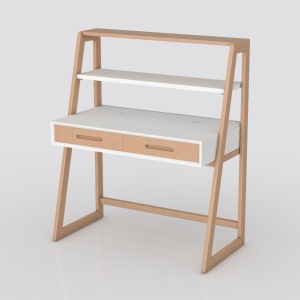
Minimalist Solid Wood Two Tone Writing Desk with Shelves 3D Model

Minimalist Brown Fabric Accent Chair Modern 3D Model
Homestyler is the ideal online design platform for anyone looking to transform their space. Featuring an easy-to-use design tool, stunning 3D renderings, diverse design projects, and helpful video tutorials, it empowers you to create beautiful interiors effortlessly, making your home design dreams a reality!
Zaprojektuj teraz za darmo
































