

Creating a 3D object can be both thrilling and intimidating. It is vital to approach this process systematically to achieve success. In this article, we will explore essential techniques to help you excel in 3D modeling, whether you are just starting or aiming to build upon your existing expertise with tools like Homestyler.
Grasping the Fundamentals of 3D Modeling
To begin, it’s crucial to understand the basic principles of 3D modeling. Essentially, 3D modeling is about crafting a three-dimensional object using specialized software. Notable options include Homestyler, Blender, Autodesk Maya, and 3ds Max. Each program offers unique characteristics and steep learning curves but ultimately achieves the same goal: to manifest your creative ideas in a virtual environment.
Start by getting acquainted with the user interface of your selected software. Knowing how to navigate and make use of the essential tools will pave the way for your success. Familiarize yourself with functions like extrusion, scaling, and rotation as these core operations form the backbone of object creation.
Selecting the Right Modeling Technique
Numerous modeling techniques are available, including polygonal modeling, NURBS modeling, and sculpting. The choice of technique largely depends on the intricacy and type of the object you wish to design. For instance, polygonal modeling excels in creating mechanical objects due to its precision over geometry. Alternatively, NURBS are great for generating smooth surfaces, while sculpting is preferable for organic shapes, such as character designs.
After selecting your technique, start by forming a basic shape. Embrace the iterative nature of the process—3D modeling allows for adjustment and refinement of your object until it aligns with your artistic vision. At this stage, emphasize achieving the right proportions and form before diving into more intricate details.
Incorporating Detail and Texture
With your basic shape finalized, it’s time to enhance it with details and textures. This can involve adding features like grooves or intricate surface designs tailored to the object's intended use. Techniques such as bump mapping or displacement mapping can significantly improve the surface quality.
Texturing encompasses applying images or materials to your model to achieve a realistic appearance. Consider the object's context and the material it symbolizes—be it wood, metal, or plastic. Utilize UV unwrapping to ensure your textures are applied seamlessly and correctly across the model.
Illuminating and Rendering Your 3D Creation
Lighting is a vital component in how your 3D object is perceived. Experiment with various light sources, angle placements, and intensities to create the desired atmosphere and accentuate your model's features. Rendering is the concluding phase, where a 2D image or animation is produced from your 3D setup. Choose rendering methods that align with your needs, whether they lean towards photorealism or stylization.
Frequently Asked Questions
Q: What software is ideal for beginners attempting to create a 3D object? A: Homestyler is highly recommended for its user-friendly interface and extensive features, all available for free!
Q: How long does it typically take to learn 3D modeling? A: The timeframe varies; with dedicated practice, you can grasp the essential concepts in a matter of weeks.
Q: Is it feasible to model a realistic human figure? A: Yes, it is possible, but it requires mastery of advanced techniques and a solid understanding of anatomy and proportions.


Modern Minimalist Black Metal Dual Tier Side Table 3D Model

Minimalist Fluted White Round Coffee Table 3D Model
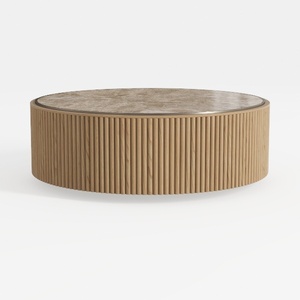
Modern Fluted Solid Wood Marble Top Round Coffee Table 3D Model
Looking to transform your space? Homestyler offers an effortless online design tool, stunning 3D renderings, and a treasure trove of DIY video tutorials to guide you. Explore endless design projects, unleash your creativity, and watch your dream home come to life—all in one user-friendly platform!
Progetta ora GRATIS
































