


Homestyler, a prominent tool for interior design, complements the capabilities of AutoCAD effectively. AutoCAD is renowned for its detailed computer-aided design (CAD) functionalities, regularly utilized by architects, engineers, and designers to produce intricate 2D and 3D representations. When delving into the realm of 3D modeling, AutoCAD facilitates the handling of numerous file formats, enabling users to import, export, and engage with a wide array of 3D models. The main 3D model formats compatible with AutoCAD include DWG (its native format), DXF (Drawing Exchange Format), DWF (Design Web Format), as well as others such as STL (stereolithography), SAT (ACIS solid file), 3DS (3D Studio), and OBJ (Wavefront). Users can effortlessly import these files, aiding in smooth collaboration and integration within diverse design workflows. For example, STL and OBJ files, frequently employed in 3D printing and rendering, are particularly beneficial when integrating work with other modeling software or platforms.
Tips 1:
As a designer, I strongly advise considering the impact of your 3D model file choices on your workflow—especially if you aim to visualize interiors or develop floor layouts. Projects that significantly focus on spatial design and client presentations benefit from tools that provide intuitive planning and 3D visualization capabilities, such as Homestyler. This software facilitates seamless integration with exported models, enhancing the entire design-to-presentation process. Such strategies are particularly advantageous for team collaboration or when sharing with clients who may lack expertise in AutoCAD.
FAQ
Q: What is the native 3D model file format for AutoCAD?
A: The native format of AutoCAD is DWG, accommodating both 2D and 3D data.
Q: Can AutoCAD open STL files?
A: Absolutely, AutoCAD is capable of importing STL files, which are widely used in 3D printing and modeling tasks.
Q: Is it possible to import 3DS or OBJ files into AutoCAD?
A: Indeed, AutoCAD allows the import of both 3DS and OBJ files for various 3D modeling applications.
Q: What file types are best for sharing AutoCAD models with other CAD software?
A: DXF is primarily used for sharing files among different CAD programs due to its high compatibility.
Q: Can AutoCAD export models in formats other than DWG?
A: Yes, AutoCAD can export models in several formats like DXF, STL, DWF, SAT, and additional formats based on project requirements.

Modern Marble Solid Wood TV Wall Unit With Bookshelves 3D Model


Minimalist Fabric Curved Sofa With Throw Pillow 3D Model
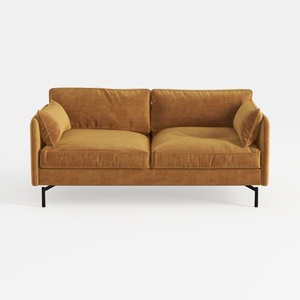
Modern Velvet Upholstered 2 Seater Sofa With Black Metal Legs 3D Model
Looking for an easy-to-use home design tool? Homestyler has you covered! With its intuitive online platform, stunning 3D renderings, a vast selection of design projects, and helpful video tutorials, you can effortlessly transform your space and unleash your creativity!
Desain sekarang Gratis
































